
Corporate tax management
Set up each company once. Keep its tax record current.
TaxDesk keeps filings, payments, CRA records, ownership, documents, and tax history together as your group changes.
For Canadian businesses, corporate groups, and their advisors.
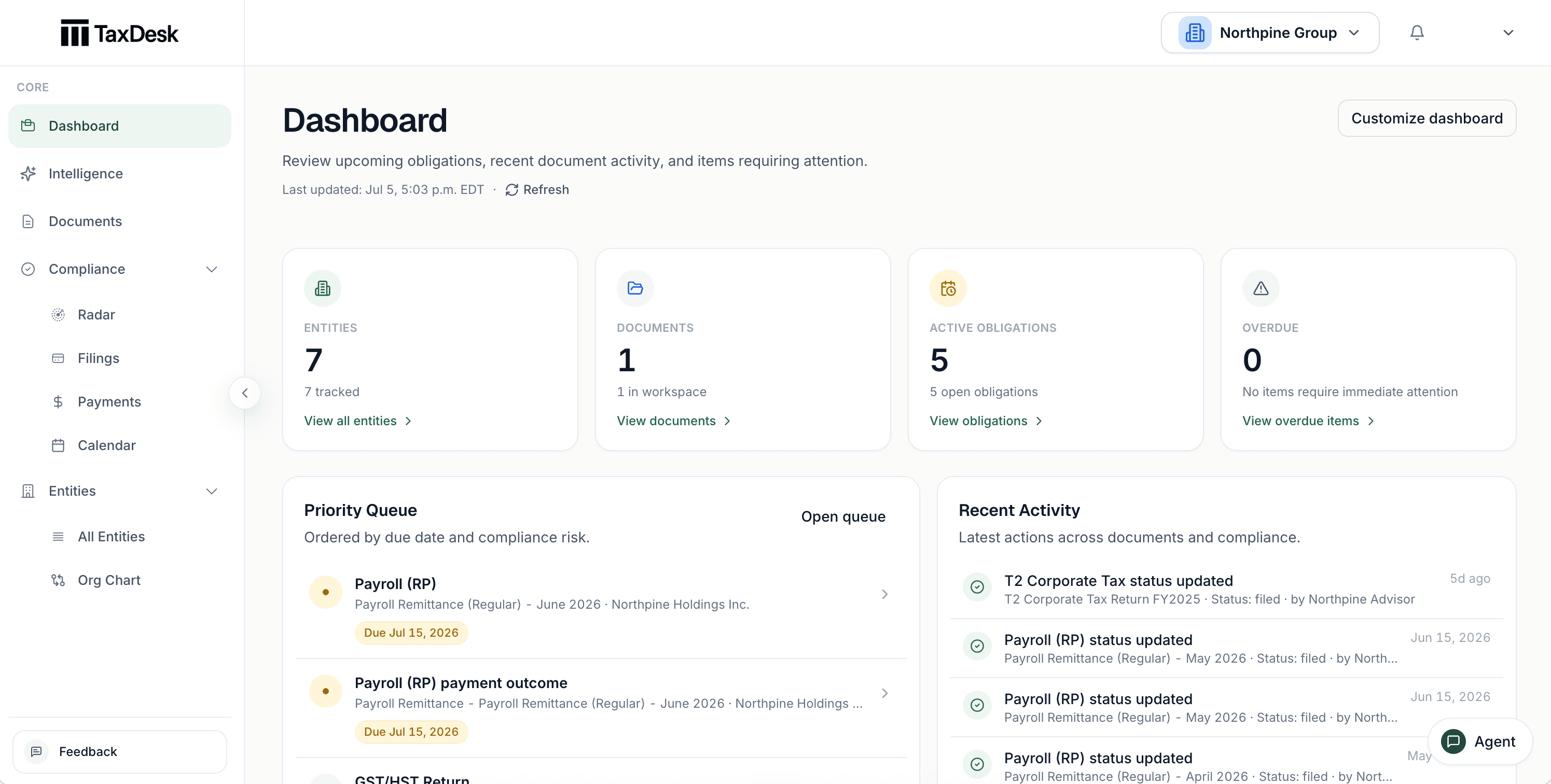
- 1Overdue, upcoming, and review counts for the whole group
- 2Decisions that need review, collected in one place
- 3Upcoming and overdue obligations, with due dates
- 4Recent activity: uploads and status changes
How the record works
One record for each entity, kept current as the work happens.
- 01
Add the entity.
Record the entity type, jurisdiction, fiscal year-end, identifiers, and status.
- 02
See what’s due and what’s up next.
Record corporate income tax, GST/HST, payroll, and other program settings.
- 03
Keep the source with the work.
Keep documents with the entity, period, obligation, and record they support.
- 04
Review what changed.
Review proposed facts, status history, ownership changes, and tax balance entries.
Set it up once. Know what’s due next.
Enter each entity’s tax programs and filing settings. TaxDesk uses these settings to create filing and payment tasks with due dates. TaxDesk does not file returns or connect to CRA portals.
- Support for corporate income tax, GST/HST, payroll, trusts, and other tax programs
- A due date, status, history, and supporting evidence for each obligation
- Calendar, upcoming, and overdue views for all entities
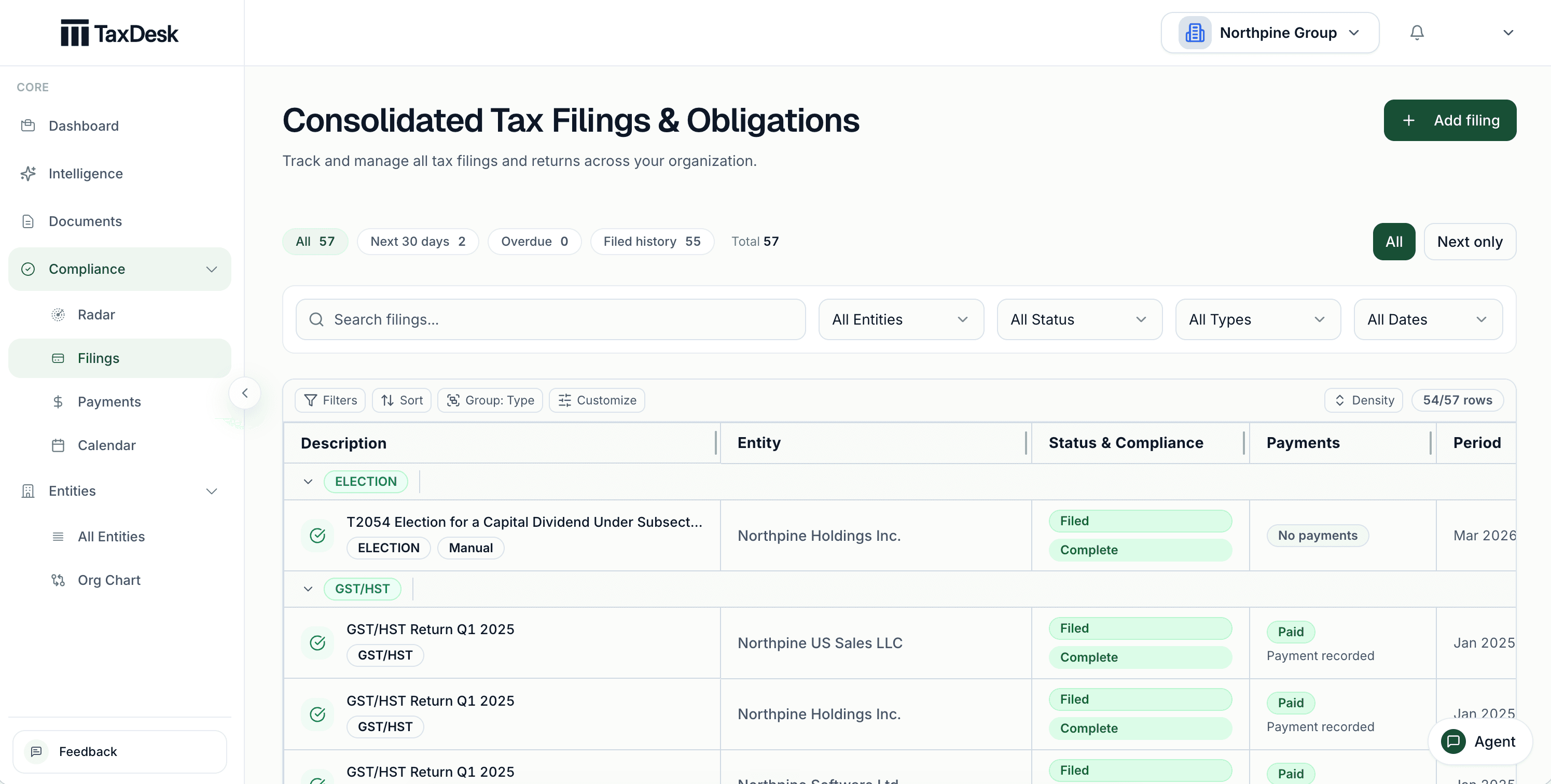
- 1Open, overdue, due-soon, and filed work, counted
- 2Search, or filter by entity and type
- 3Work grouped by entity
- 4A status on every filing
- 5Payments counted beside the filing, with the next due date
See every due date on one calendar.
Filing and payment tasks appear on the dates they are due, colour-coded by type and status, across every entity in the workspace.
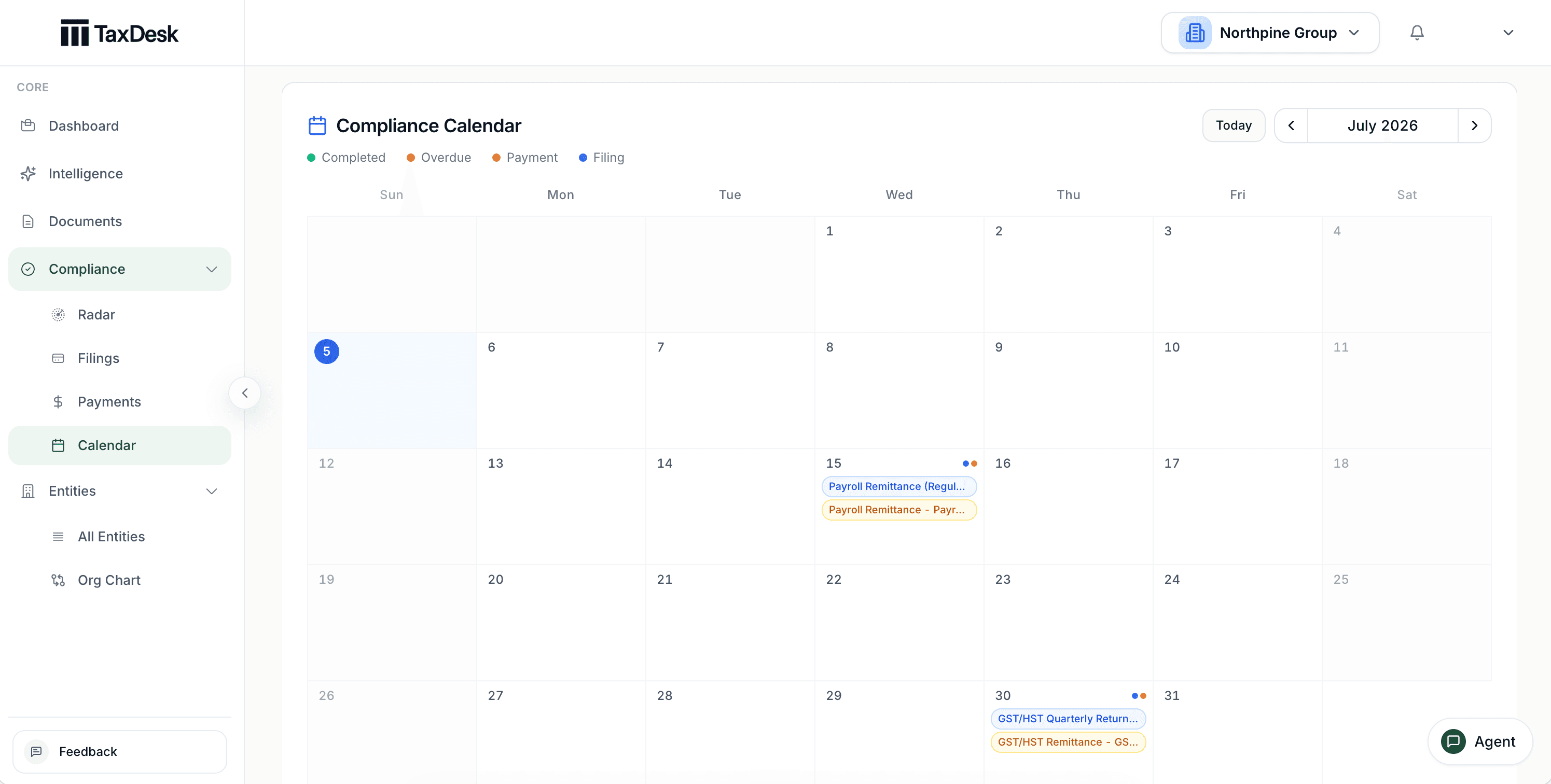
- 1Colour-coded by type and status
- 2Filing and payment tasks on the dates they are due
- 3Open a day to see everything due, across entities
- 4Page through months, or jump back to today
Record what each filing produced.
Every payment across the group sits in one list with its balance, due date, and status, and shows what it still needs, such as proof. For each filing period, record whether a payment is due, a refund or credit is expected, or no remittance applies.
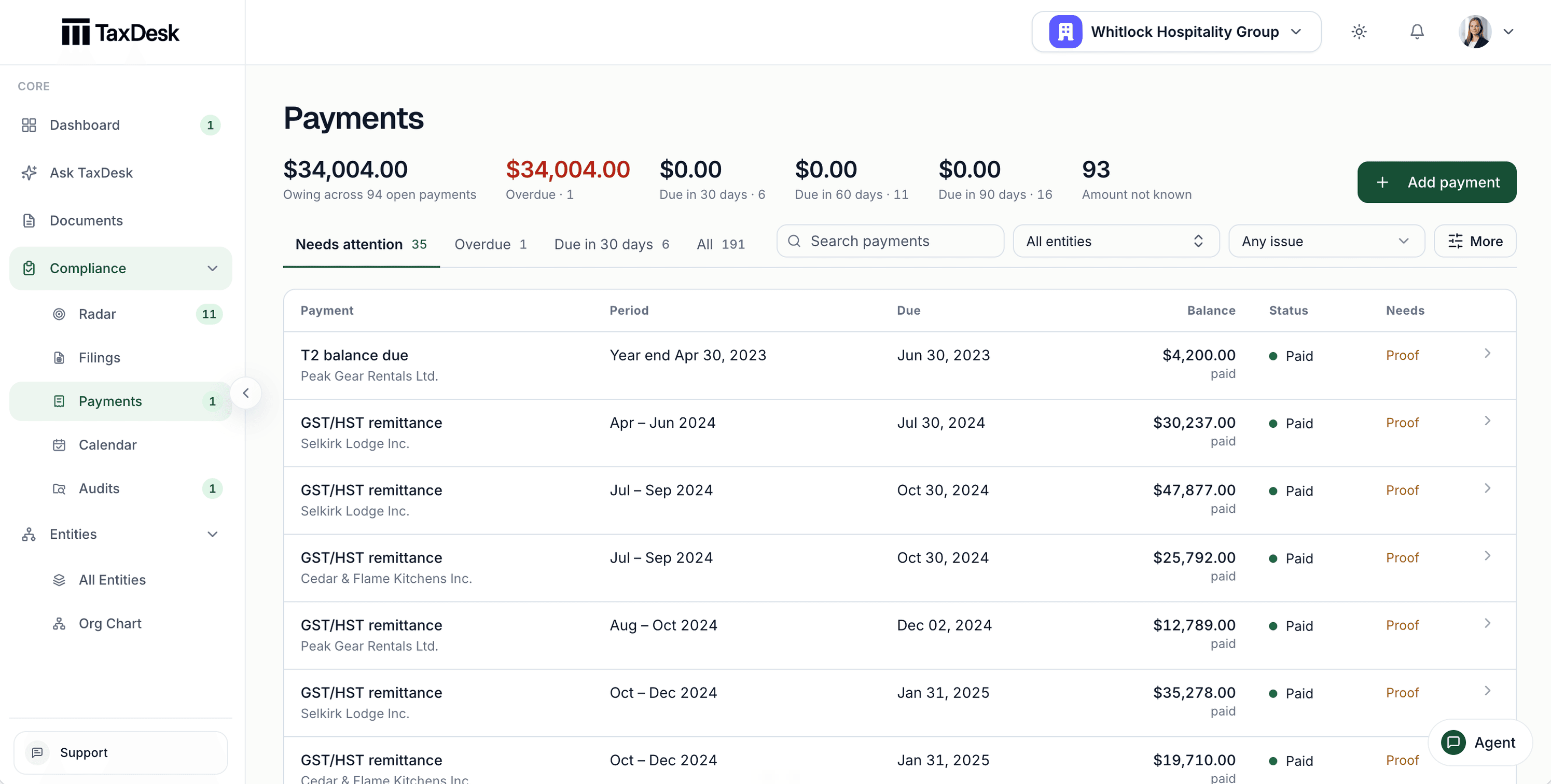
- 1Amount owing, overdue, and due soon across every payment
- 2Needs attention, overdue, and due in 30 days
- 3Each payment's status
- 4What each payment still needs, such as proof
Track a CRA review as its own case.
Record the requested items, the response date, the linked documents, and the outcome, and see how many items still have no evidence. The CRA letter stays open beside the case.
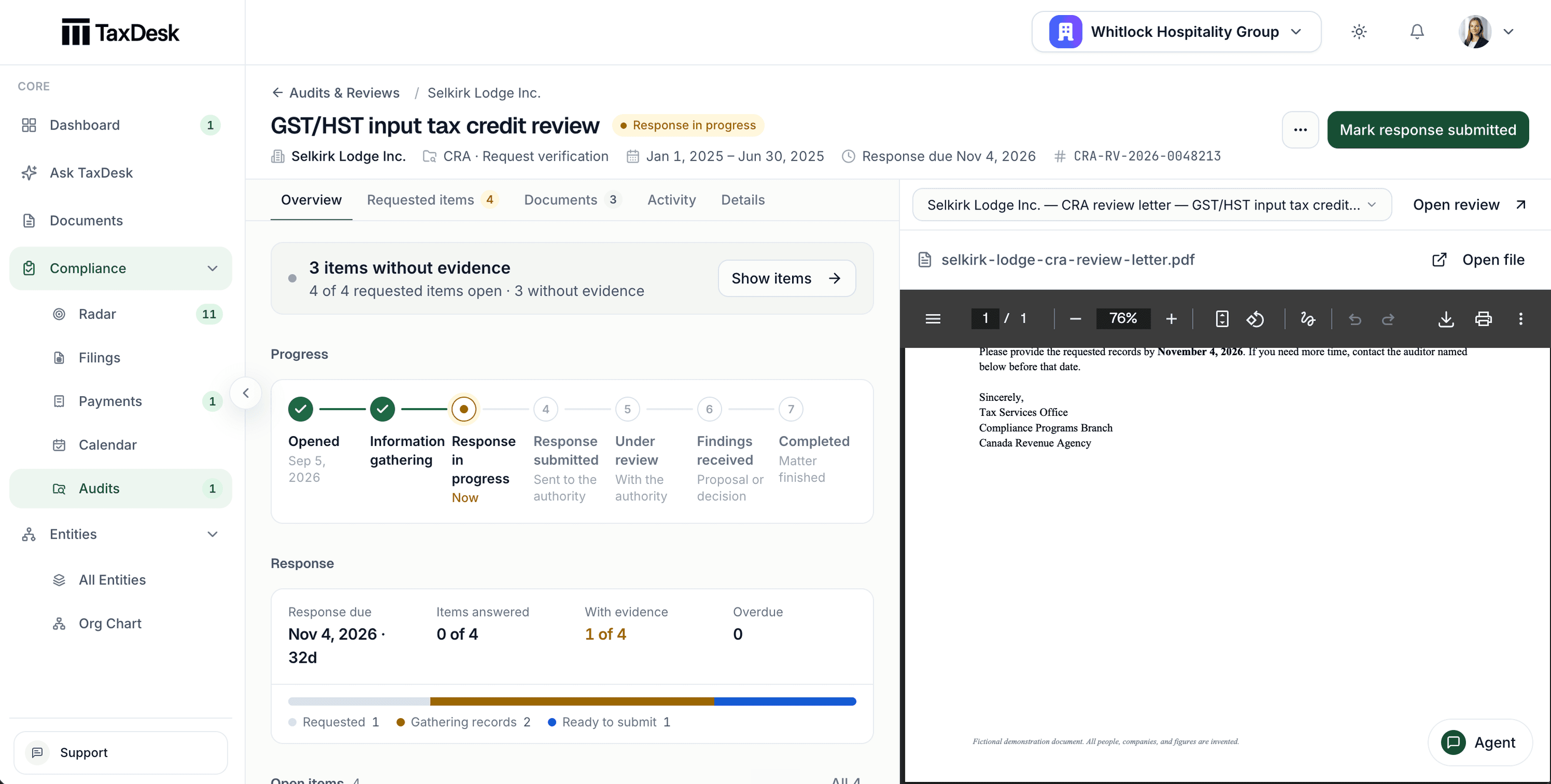
- 1Requested items, linked documents, and activity, on one case
- 2Items with no evidence linked, counted
- 3The review's stage, from opened to completed
- 4The CRA letter, open beside the case
Deadline reminders by email.
Each workspace can receive a digest of overdue and upcoming filings and payments, so the next due date doesn’t depend on someone checking.
Deadlines that follow the rules.
T2 balance-due dates start at two months after year-end. Three-month and quarterly instalment rules apply only after you confirm the entity qualifies.
Keep a complete record for each entity.
Keep the entity profile, tax programs, obligations, documents, ownership, governance, and tax balances in one place. Your team can find the current information without checking separate spreadsheets and folders.
- Entity type, jurisdiction, fiscal year-end, and identifiers
- Open obligations and linked documents beside each entity
- A profile status that shows what is still missing
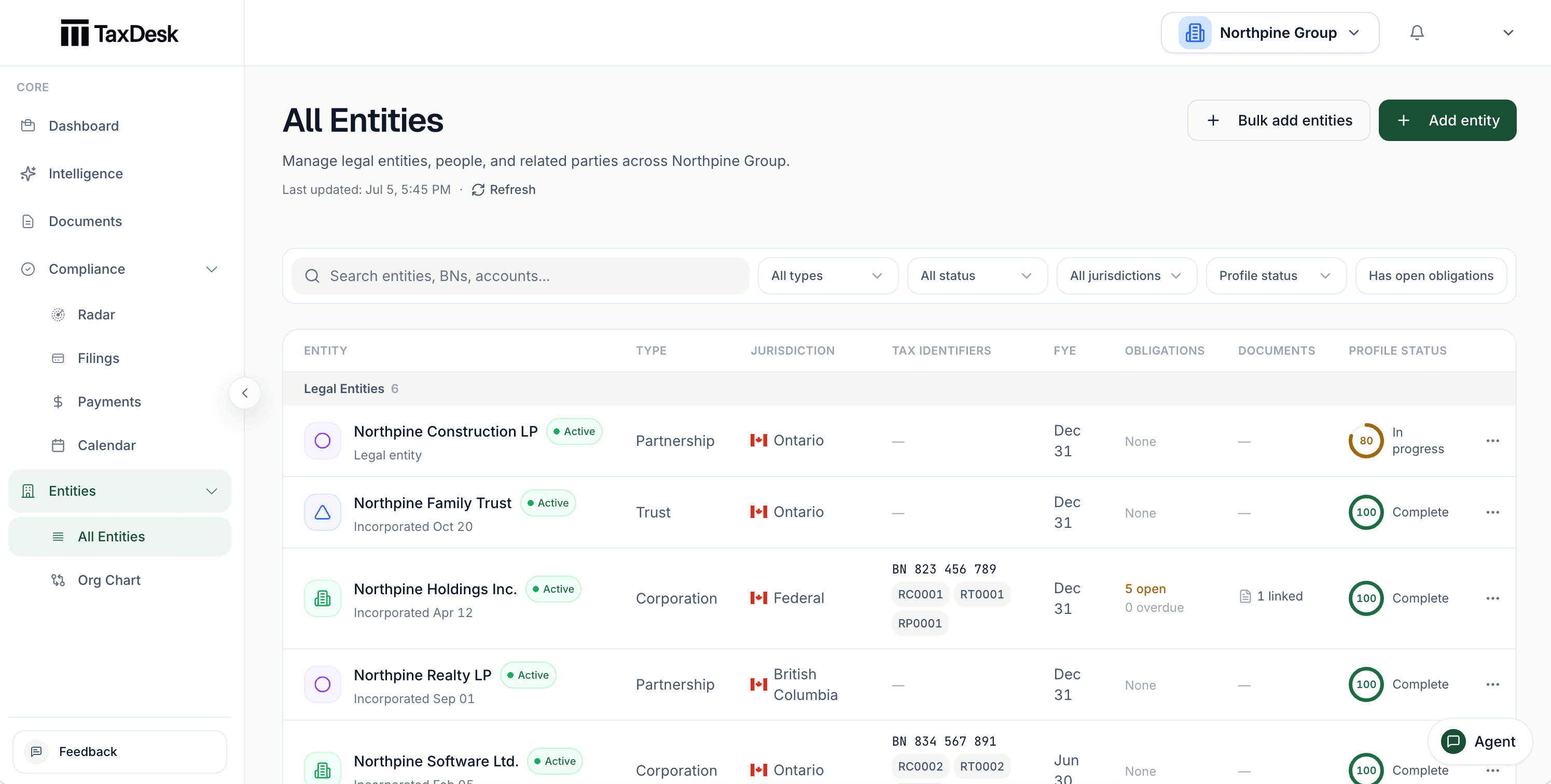
- 1Every entity in one list, with a count
- 2Find an entity by name
- 3Filter to entities with missing documents or items to confirm
- 4Each entity with its CRA program accounts and a status
See how the group is owned.
Record ownership relationships between individuals, trusts, corporations, and partnerships. View the structure as of a date and export it as a PDF.
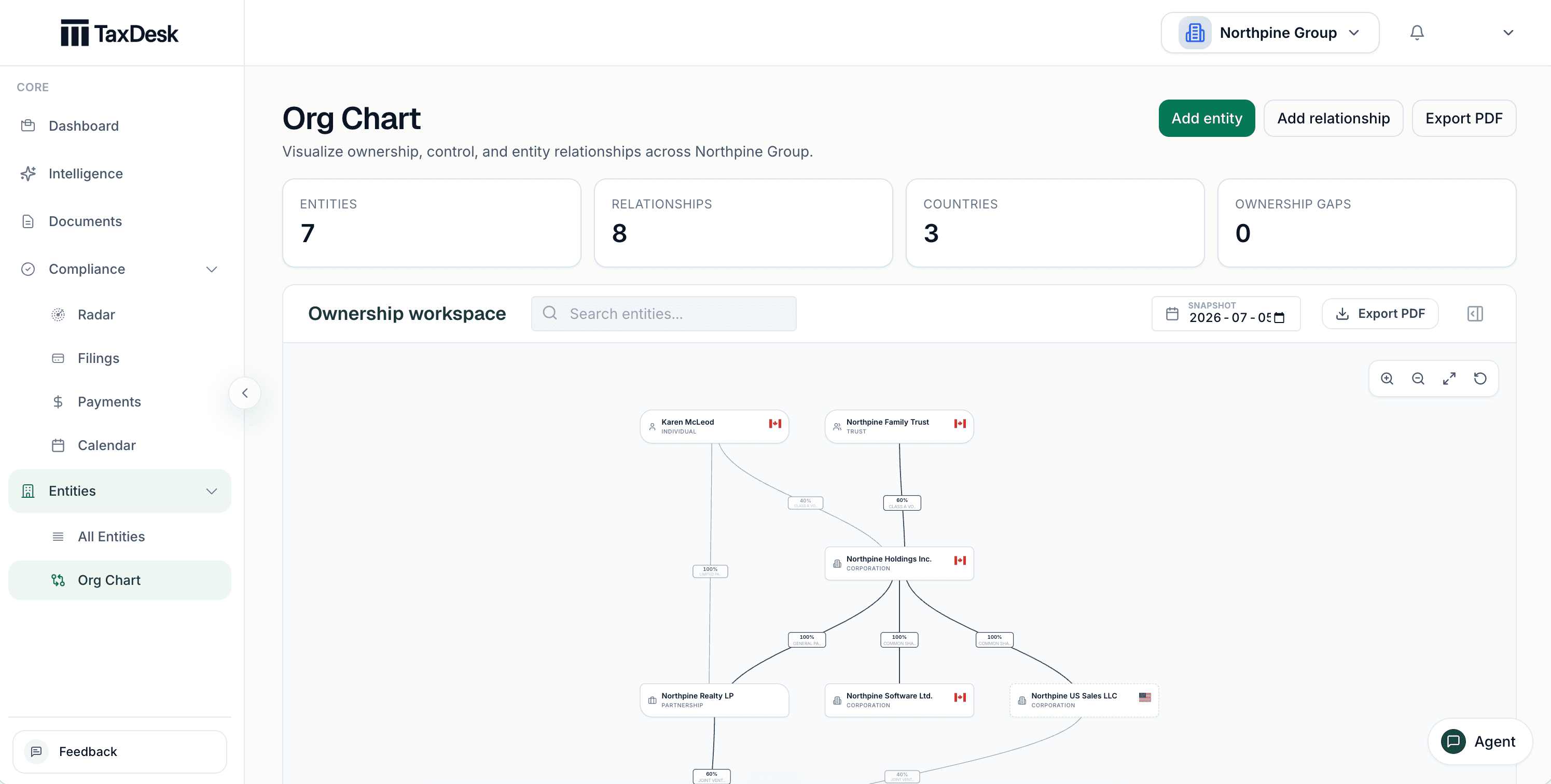
- 1View the structure as of a date
- 2Export the chart
- 3Individuals, trusts, and corporations on one chart
- 4Ownership percentage on every link
Open any entity from the chart.
Select an entity to see its country, jurisdiction, fiscal year-end, and each owner with the class it holds. Focus the chain to follow ownership up or down.
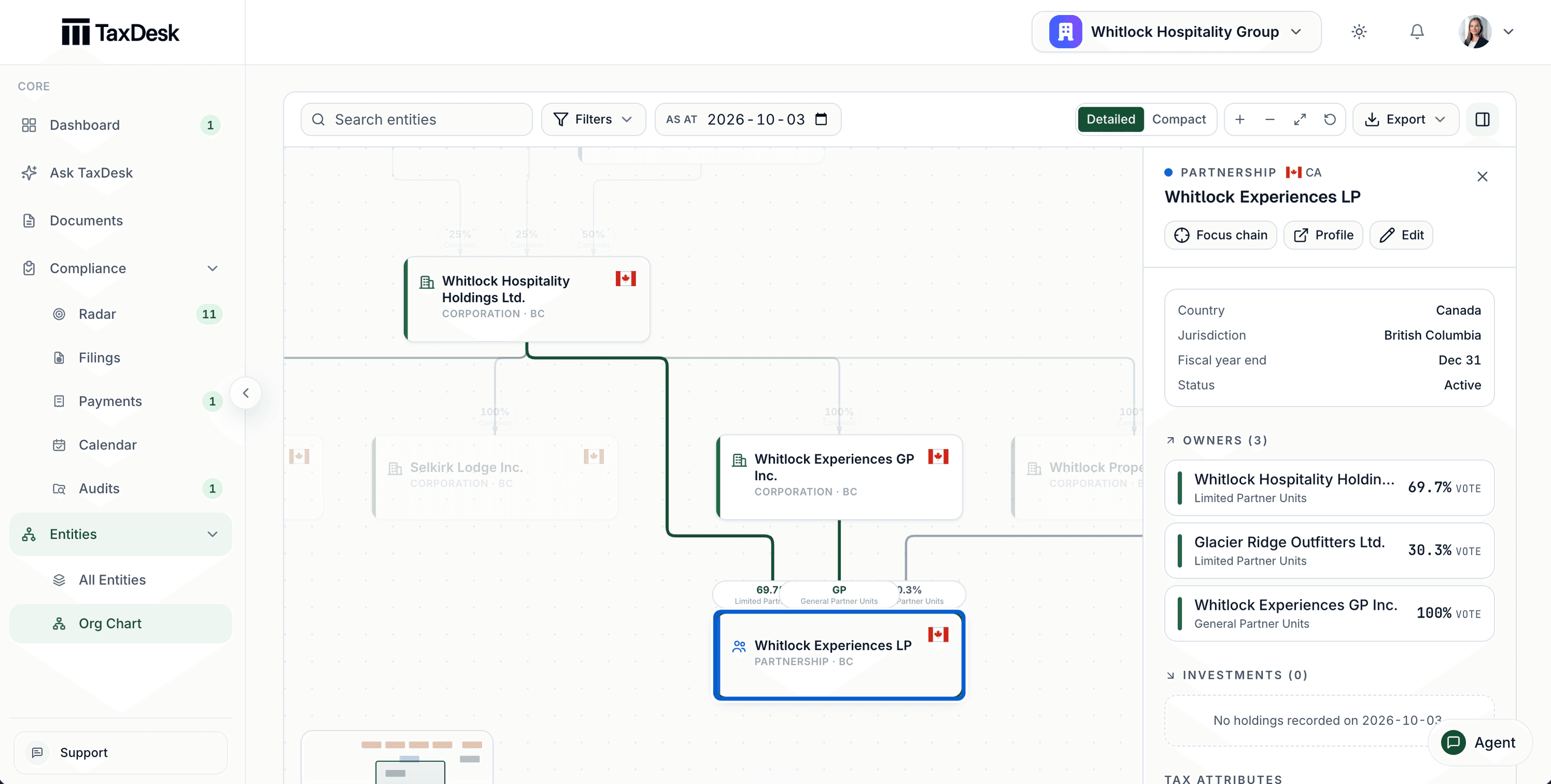
- 1Focus the ownership chain, open the profile, or edit
- 2Country, jurisdiction, fiscal year-end, and status
- 3Each owner, with the class it holds
Amalgamations and acquisitions of control.
A guided review works through the entities, tax years, and CRA accounts affected before the new structure is finalized.
Governance and signing authority.
Record directors, officers, and signing authorities with their appointment dates.
Every change in the activity feed.
Status changes and changes made from a connected AI agent appear in the entity’s history.
Upload the document. TaxDesk reads it.
TaxDesk recognizes returns, information returns and elections, CRA and provincial notices, financial statements, corporate records, agreements, and banking records. It files each one to the right entity and year and links every fact it finds to the page it came from.
- About 50 Canadian business document types, from T2 returns and notices of assessment to section 85 rollover agreements and bank confirmations
- Figures checked against the form’s own arithmetic, with anything that doesn’t reconcile flagged
- Financial statements compared with the T2’s GIFI figures
- Schedule 8 CCA and Schedule 4 losses brought into the entity’s balances, with conflicts sent to review
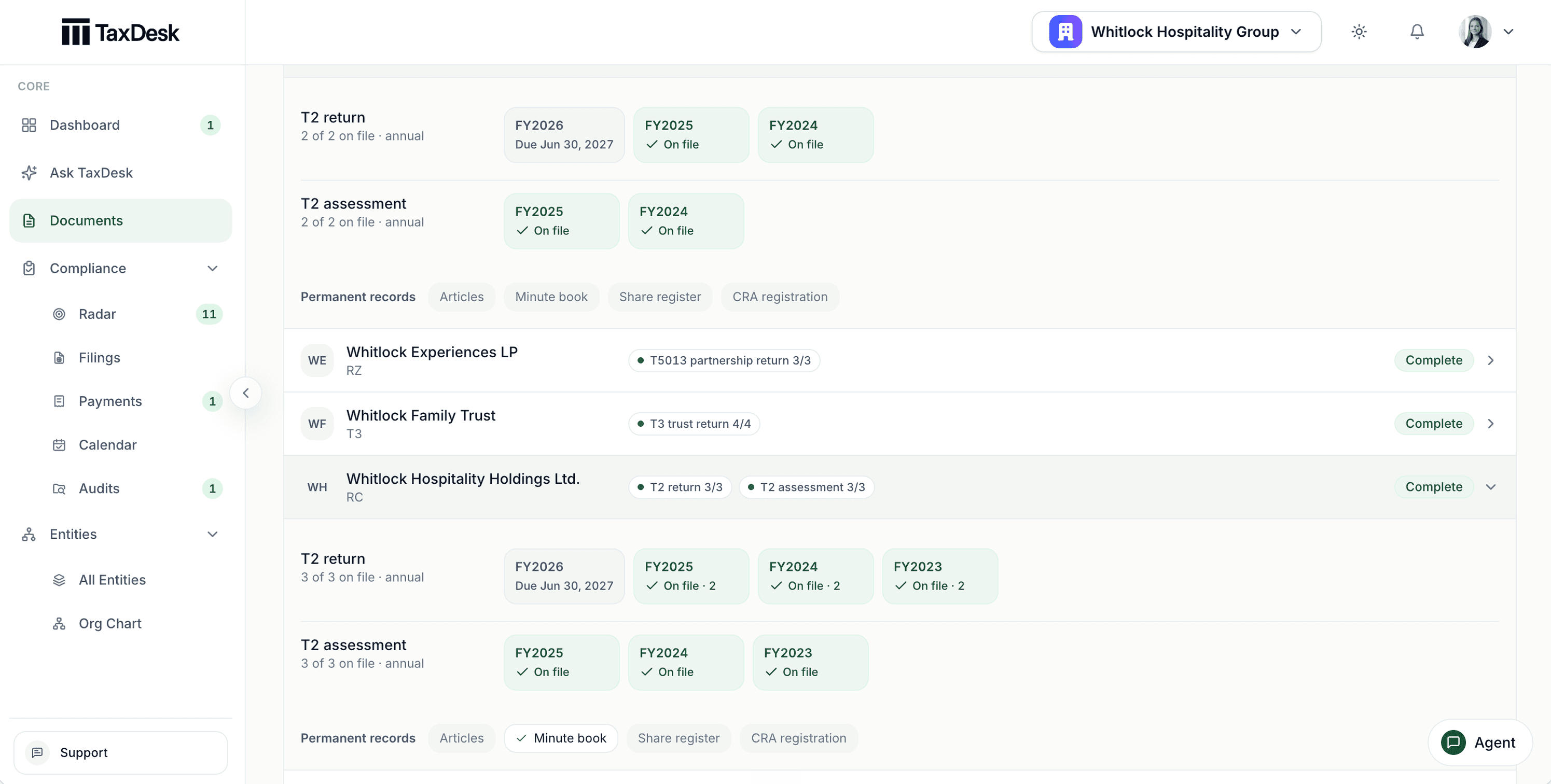
- 1Partnerships and trusts get their own schedule: T5013 and T3
- 2Each period shows what is on file and what is due next
- 3Returns and assessments filed to the right year
- 4Permanent records tracked separately
Set up a group from its documents.
Upload a pile of returns, notices, and corporate records. TaxDesk groups what it finds into one proposed setup for each entity, and nothing is created until you confirm.
A guided review queue.
Work through suggested facts one decision at a time, with the source page beside each one.
Your label stands.
If you choose a document type when you upload, TaxDesk keeps it. When it reads the document differently, it asks instead of overriding you.
A review memo for the file.
Export a PDF summary of a return’s review to keep with your working papers.
Track tax balances and ownership changes.
Record each change to a tax balance as a dated entry. Record equity transactions that affect current ownership. TaxDesk keeps the history with the entity for later review.
Every balance has a dated history.
Record CDA, ERDTOH, NERDTOH, GRIP, safe income, and loss balances as dated entries, and open the history behind any of them.
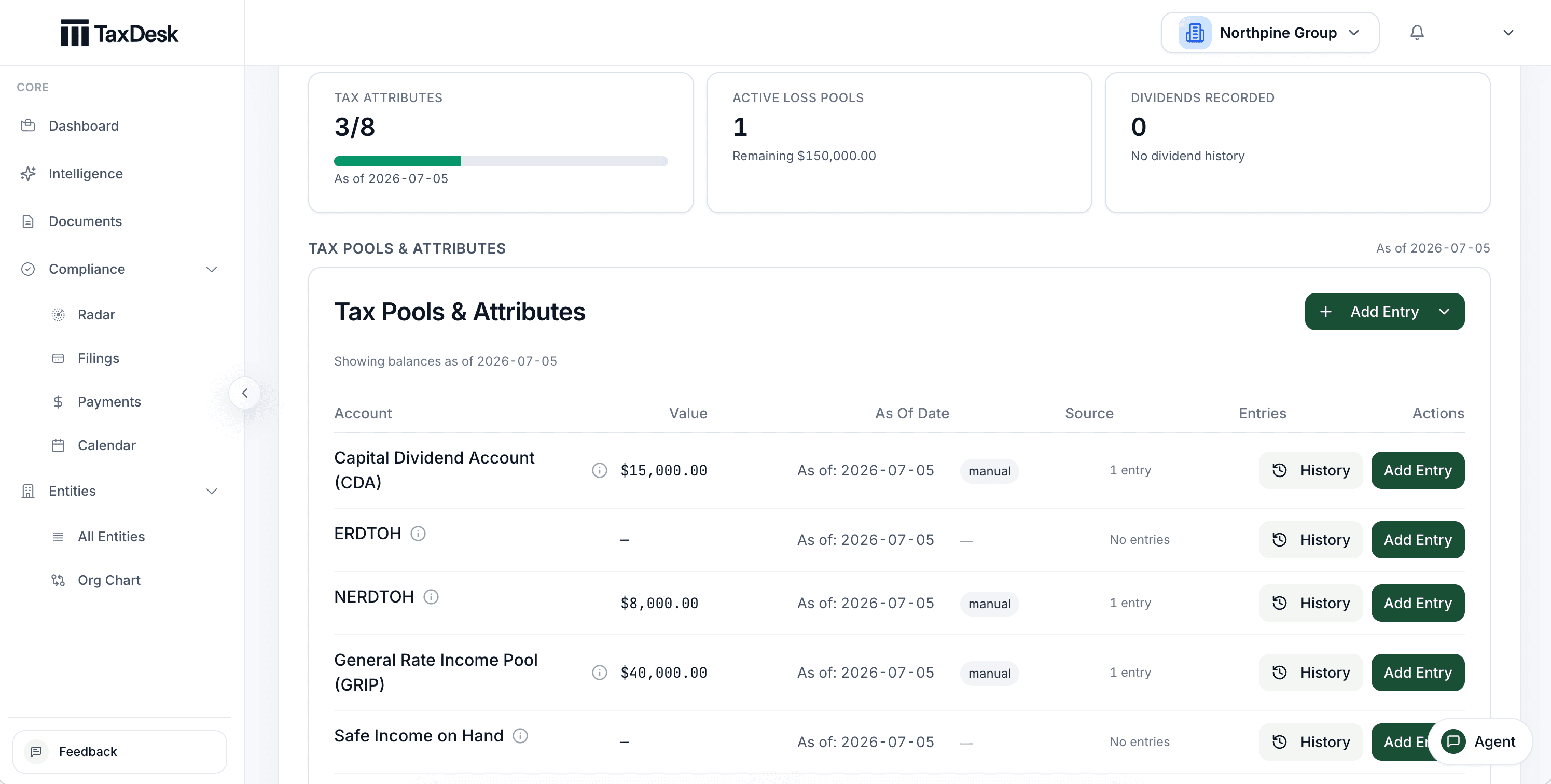
- 1CDA, ERDTOH, and NERDTOH, each with its balance
- 2Each balance carries an as-of date and its source
- 3Open the dated history behind any balance
- 4Balances built from dated entries, drawn as a running history
Ownership follows the transactions.
Record share transactions and TaxDesk calculates current shareholdings, ownership percentages, PUC, and ACB.
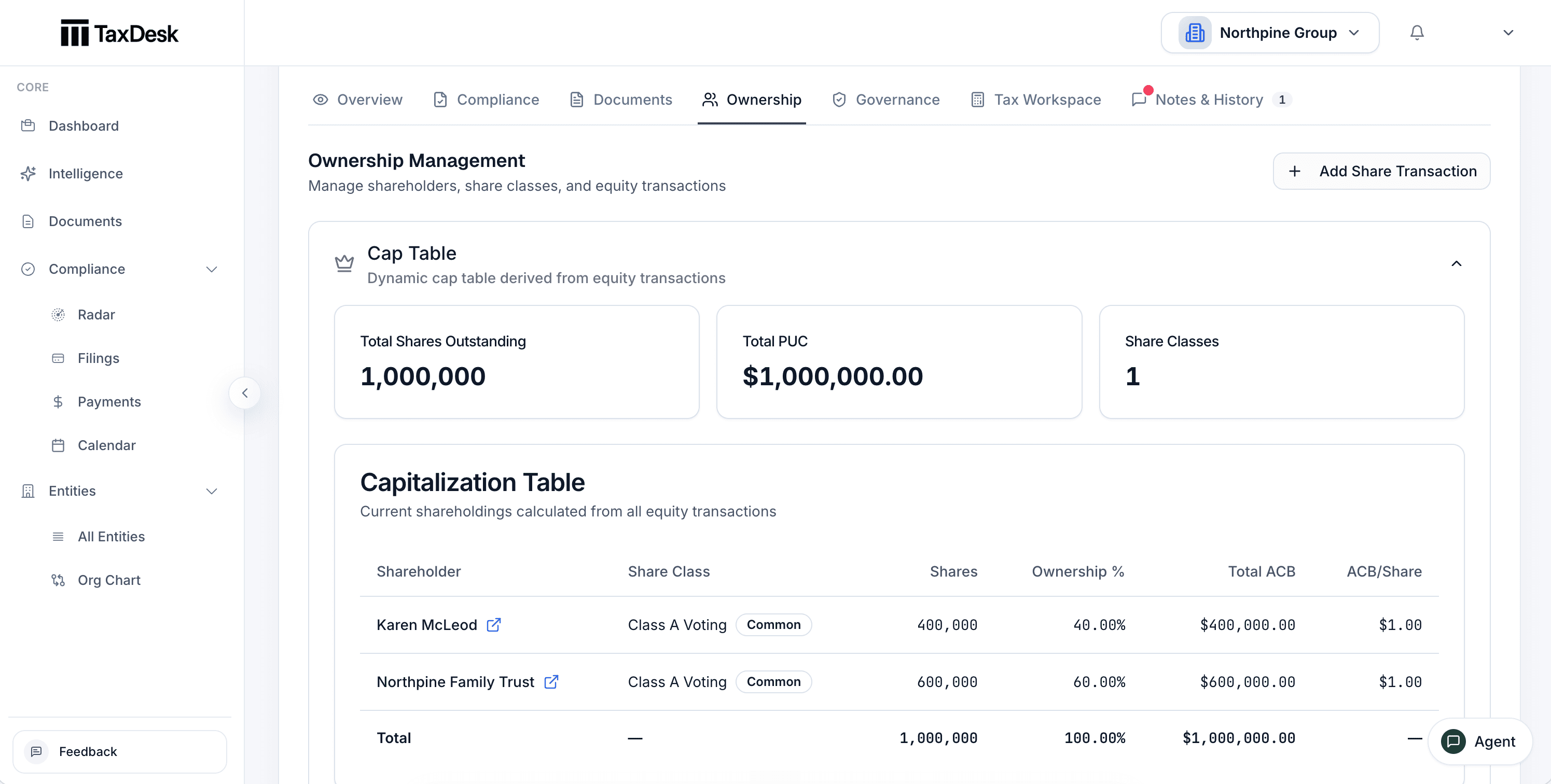
- 1Ownership, governance, and notes sit on the entity
- 2Changes come from recorded share transactions
- 3Shares outstanding, total PUC, and share classes
- 4Shareholders, classes, ownership percentage, and ACB
Every share transaction, on one ledger.
Review issues, transfers, and redemptions by date, filter by type and class, and export the ledger as CSV or PDF.
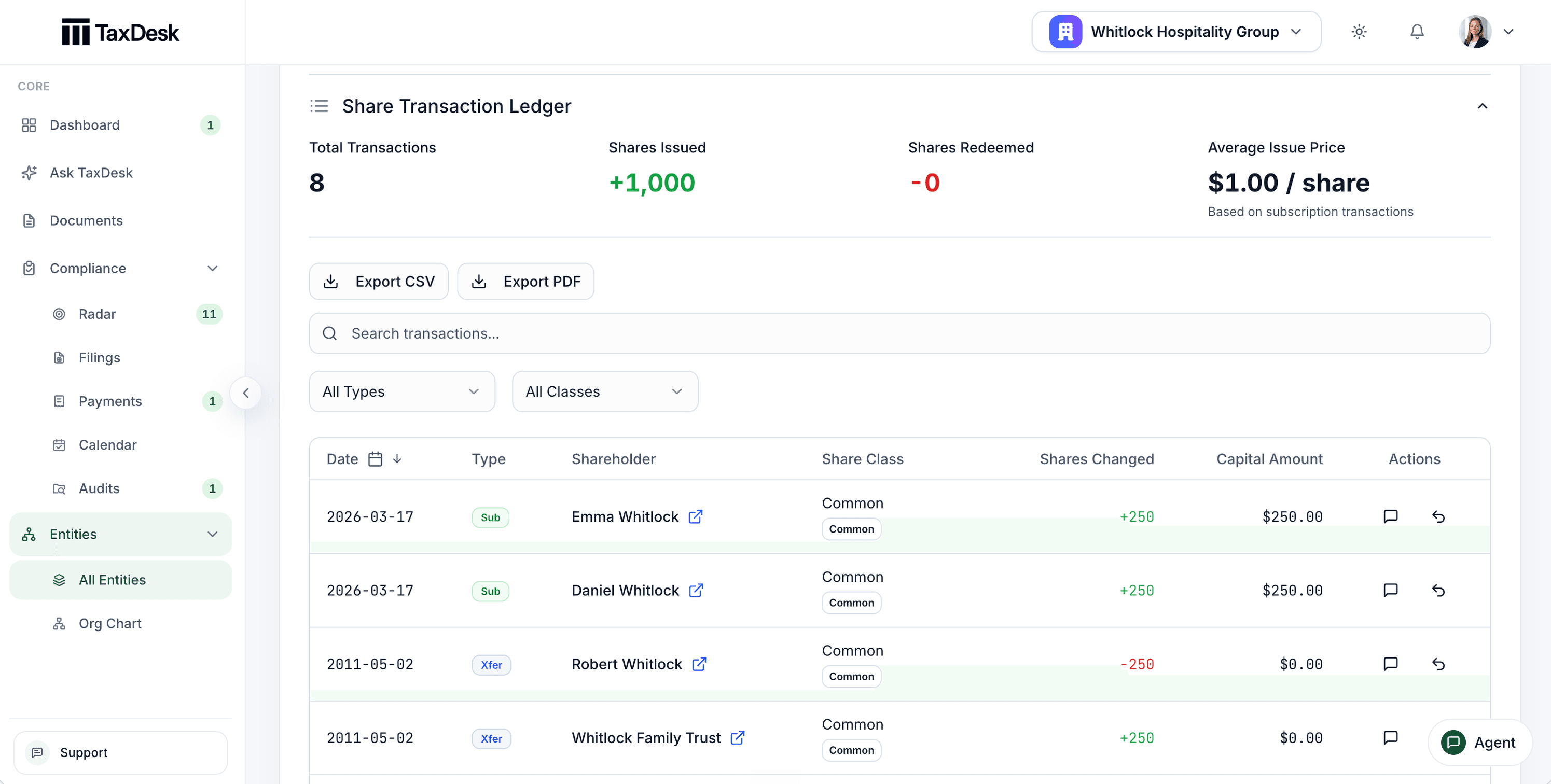
- 1Transactions, shares issued and redeemed, and average issue price
- 2Export the ledger as CSV or PDF
- 3Filter by type and share class
- 4Every transaction with its shareholder, class, shares, and capital
Dividends that update their slips.
Record a dividend, and the related T5, T2054, or NR4 obligations are created or updated with it.
Loss pools by year.
Track non-capital and net capital losses with their originating year, expiry, and each application against income.
CCA by class and year.
Keep UCC and CCA for each class and tax year, brought in from Schedule 8 or entered by hand.
Review what needs attention.
Compliance Radar reviews the information in your workspace. It counts overdue and upcoming work, orders what needs attention by urgency, and shows missing evidence and records that may need review.
- Overdue and upcoming work, ordered by urgency
- See missing information and evidence gaps
- Review suggested changes when documents disagree with your records
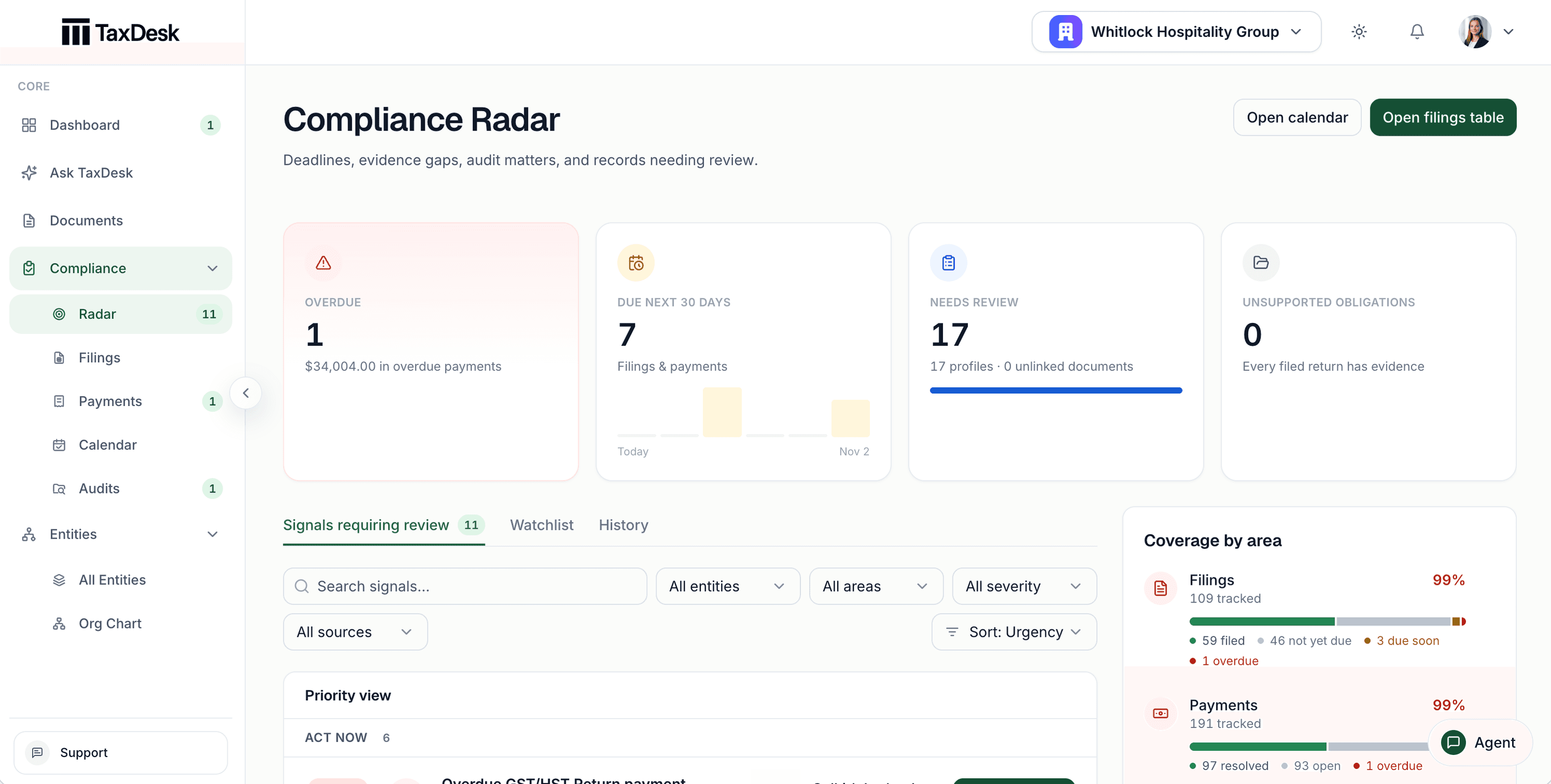
- 1Overdue work, with the amount outstanding
- 2Work due in the next 30 days, day by day
- 3Signals requiring review, a watchlist, and history
- 4Coverage by area: filings, payments, profiles, and documents
Ask questions of your own records.
Ask the TaxDesk Agent about the entities, balances, and documents in your workspace. Answers are drawn from workspace evidence only, and tax positions still need to be verified against CRA sources before filing.
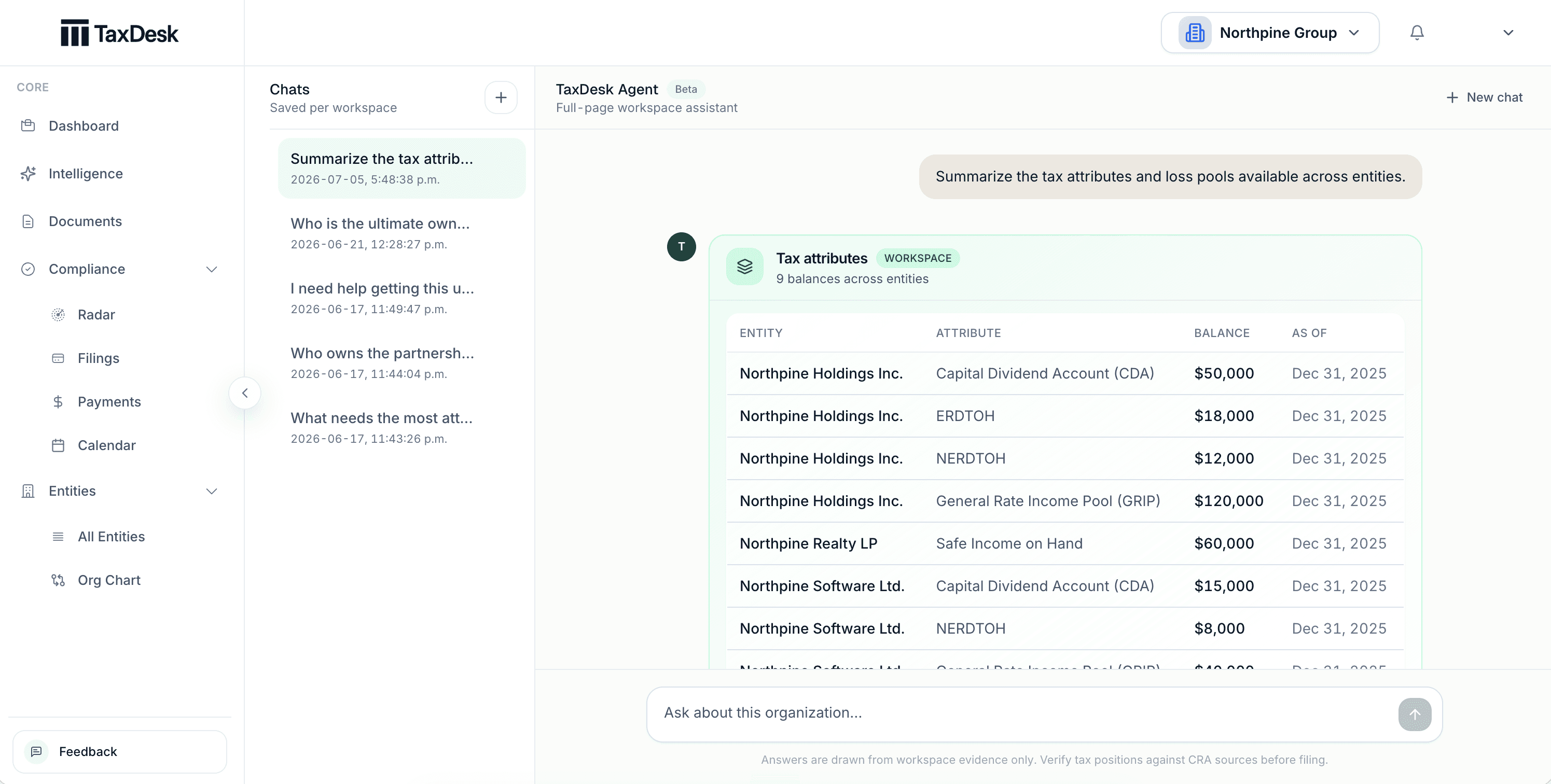
- 1Conversations saved per workspace
- 2Answers come from your workspace records
- 3Ask in plain language
- 4Verify tax positions against CRA sources before filing
Or work from your own agent.
Connect Claude, ChatGPT, Codex, or Microsoft Copilot to TaxDesk and do the same work from a conversation, with every change logged and reversible. TaxDesk for AI agents
Where TaxDesk fits
A record for the work, not a filing tool.
TaxDesk does not prepare or file returns, and it does not connect to CRA portals. It keeps the record around that work accurate, dated, and easy to review.
- Returns and filingYou or your accountant prepare and file through your usual channels.TaxDesk records the status, the dates, and the documents behind each filing.
- CRA programsYou enter each entity’s program accounts and filing settings.TaxDesk uses them to create filing and payment obligations. There is no live CRA connection.
- Changes to the recordYour team decides when a document disagrees with the record.TaxDesk links each fact to its source document. A fact that conflicts with your records waits for approval.
One record by design
Use the same information for every part of the work.
- 01
Manage entity records
- Create records for corporations, trusts, partnerships, and individuals
- Record tax programs and fiscal settings
- Track ownership and governance roles
- Guide amalgamations and acquisitions of control
- Connect documents to entities and tax years
- 02
Track tax obligations
- Create filing and payment tasks with due dates
- See upcoming and overdue work in the calendar
- Record status changes and supporting evidence
- Track CRA reviews and audits as cases
- Get deadline reminders by email
- Review work across all entities
- 03
Review documents and records
- Review proposed facts from uploaded documents
- See priorities and records that need review
- Ask questions about information in the workspace
- See the records that support each answer
- Work from Claude, ChatGPT, Codex, or Microsoft Copilot
Get started
Give your team one place to manage tax work.
Add the entities you manage. Configure their tax programs. Then track obligations, documents, ownership, and tax balances in one shared record.