
Your finance team
Coordinate deadlines, gather documents, arrange payments, and keep the company’s tax history complete.
Tax operations for finance teams
Tax sits with you, alongside everything else in finance. Keep every entity, filing, payment, CRA document, and tax attribute in one place, so you know what’s due, what’s changed, and what your advisors need. Your external CPA and tax counsel still handle the technical work.
A group that grew one company at a time
Finance team → TaxDesk → external advisors
TaxDesk gives your finance team the system around the tax work. Keep your existing CPA and tax counsel, with one shared record between you.
Coordinate deadlines, gather documents, arrange payments, and keep the company’s tax history complete.
Connect entities, filing and payment status, CRA documents, ownership, and dated tax balances in one workspace.
Apply technical judgement, confirm tax positions and balances, and prepare and file returns with their usual tools.
Sound familiar?
Without a shared recordYou piece together Outlook reminders, a spreadsheet, and emails from your accountant. Filing a return and paying the balance are different tasks.
In TaxDeskSee each entity’s filing and payment dates, recorded status, and supporting evidence in one list. Follow up on the gaps with the right advisor.
Without a shared recordReturns are in last year’s folder, a CRA notice is in someone’s inbox, and ownership changes sit with the lawyer. You become the search engine.
In TaxDeskOpen the entity’s returns, notices, ownership history, and dated tax balances with their sources. Invited advisors work from that same record.
Without a shared recordThe next person inherits SharePoint folders and half a story. Nobody is sure which balances were confirmed or why something changed.
In TaxDeskThe company keeps its workspace, documents, dated balances, and change history. Invite the next person without rebuilding the tax record.
Why it gets complicated
Every corporation is a separate taxpayer. Each new company adds a full set of obligations, and the connections between companies grow faster still.
Each company files its own returns, holds its own CRA accounts, and gets its own CRA notices. None of it adds up on its own.
Corporate tax obligationsYear-ends, GST/HST schedules, and payroll schedules can differ from company to company. The group’s calendar is the sum of many separate ones.
Tax deadlines toolCorporations under common control are generally associated, and they share one small business limit. Your accountant decides how to split it. The record should show every company involved.
Ownership and share classesPrior returns, notices, and balances are what the next advisor, lender, or buyer asks for. They’re also the hardest to find once the person who filed them has moved on.
Organizing tax across a groupThis is general information, not tax or legal advice. Ask your accountant how these rules apply to your group.
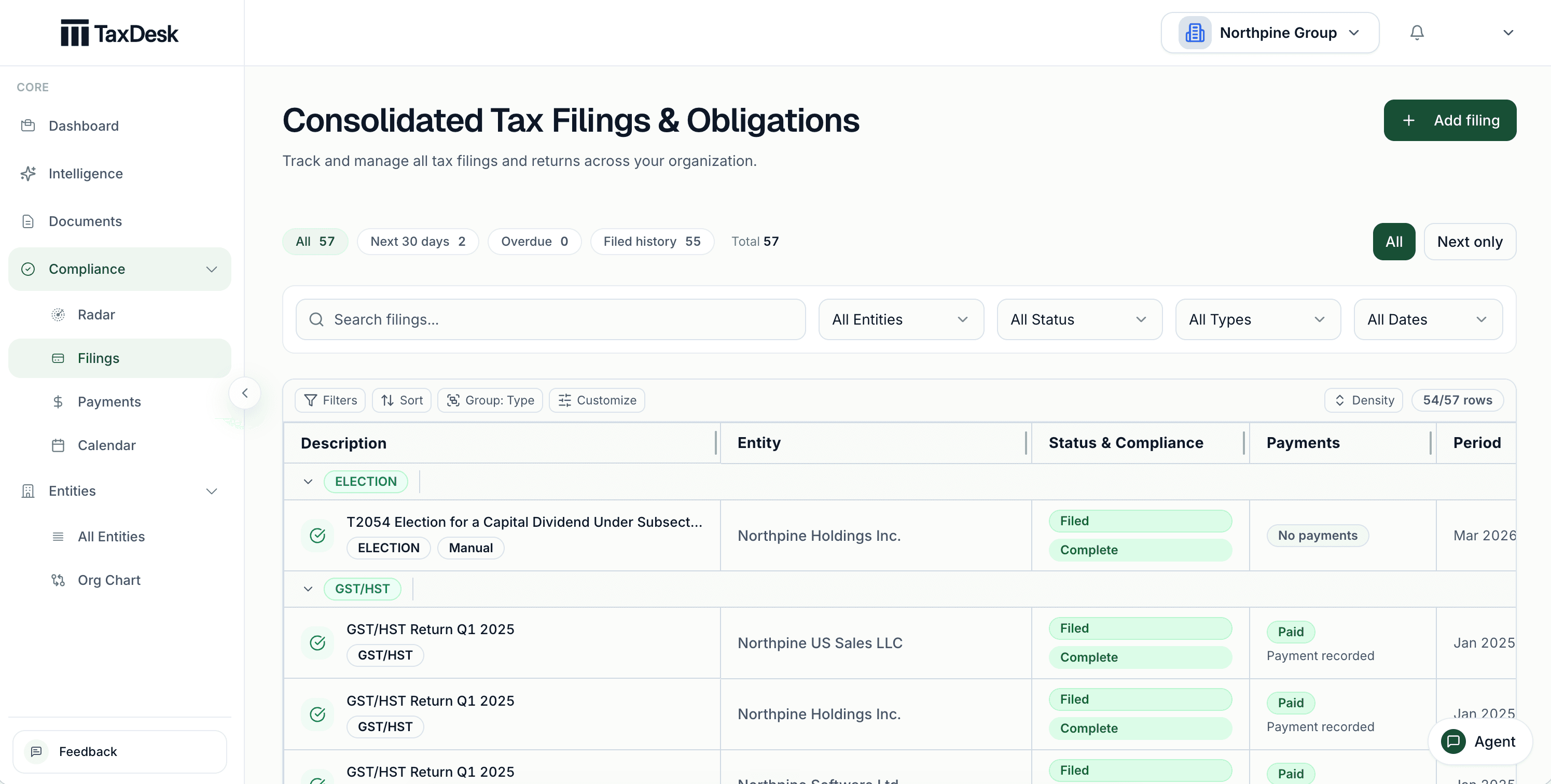
Inside TaxDesk · Filing and payment control
Record each company’s CRA accounts and filing settings. TaxDesk turns them into a shared list of due dates, with filing status, payment outcomes, and the documents behind the work.
As the group grows
What works for one company breaks quietly as you add more. Here’s what the shared record keeps in place at each step.
A single corporation and an accountant.
A holding or property company joins.
Several companies, several advisors.
A company arrives with its own history.
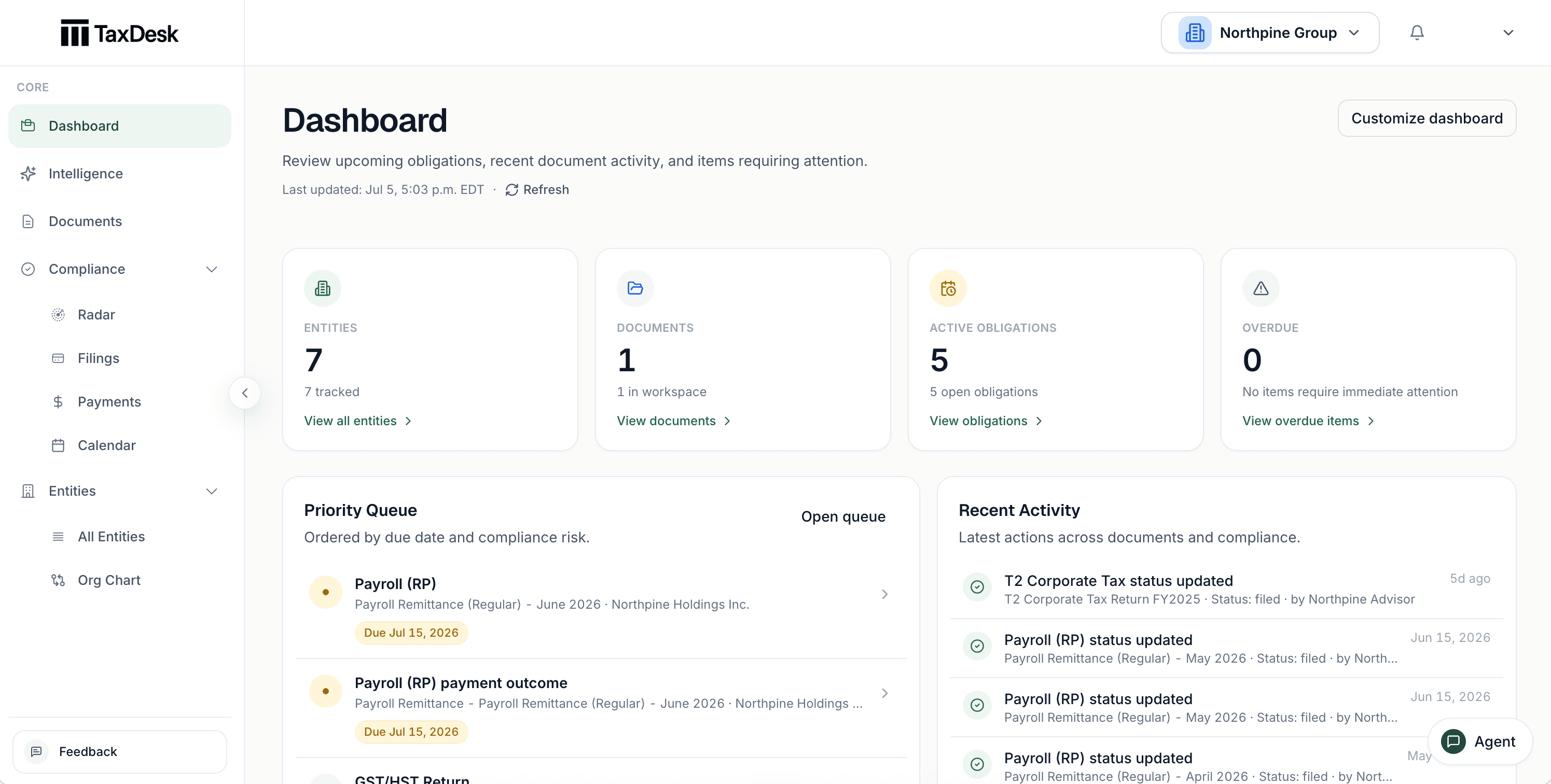
Inside TaxDesk · Dashboard
The dashboard counts companies, documents, and open work across the group. A priority list orders the work by due date and risk, and recent changes show who made them.
What’s in the record
Each company’s tax record stays separate, and ownership connects them. Your finance team owns the information and coordination. The outside accountants and tax counsel you invite work from the same sources and provide the technical judgement.
Who does what
YouYour finance team keeps information current, follows up on deadlines, and arranges payments.
TaxDeskTaxDesk keeps the due dates, recorded status, and supporting evidence together.
YouYour CPA or tax counsel confirms positions and balances, advises, and prepares and files returns.
TaxDeskTaxDesk keeps the records they need accessible, with dated history and sources.
YouYour company owns the workspace and chooses which people and advisors to invite.
TaxDeskThe record stays in place when staff or advisors change.
Who it is for
TaxDesk works best with several related Canadian corporations. It doesn’t prepare or file returns, connect to CRA, or replace bookkeeping and accounting software.
Free tools and guides
Calculators and guides for groups like yours. They’re planning aids, not tax advice.
Common questions
No. TaxDesk is built for the coordination around tax: keeping entities, deadlines, documents, recorded payments, and tax balances organized. Controllers and finance leaders can keep that record current while their CPA or tax counsel handles technical judgement, preparation, and filing.
Yes. Outsourcing preparation still leaves your finance team coordinating documents, payments, notices, and follow-ups. TaxDesk gives you and your invited advisors a shared record, while the company keeps its history when advisors change.
It keeps a corporation’s tax records and recurring work in one place: company details, CRA accounts, filing and payment due dates, ownership, tax balances, notices, and documents. TaxDesk does this for Canadian groups with several related companies. It doesn’t prepare or file returns.
Give each company its own record and connect them through ownership. TaxDesk turns each company’s settings into due dates and shows all of them in one view, so nothing depends on one spreadsheet or one person.
Accounting software records transactions. TaxDesk keeps the corporate tax record: what each company must file and pay, its returns and notices, its ownership, and its tax balances, with the documents behind them.
Yes. Invite your outside advisors to work from the same companies, deadlines, documents, and history as your team. If your advisor changes, the record stays with your company.
Yes. Upload its returns, notices, and agreements. TaxDesk links each fact it finds to its source, and anything that conflicts with your records waits for approval.
No. TaxDesk doesn’t connect to CRA. You and your accountant file the way you do today, and TaxDesk records the status, dates, and documents behind each filing.
Request access
Tell us about your entities, your finance team, and how you work with your external advisors.