
A client is a group of taxpayers.
One client can mean a holding company, several operating companies, a partnership, and a trust, each with its own obligations and documents.
Entity types and their obligationsFor CPA firms
Each client group gets its own secure workspace for companies, filings, CRA documents, ownership, and tax balances. Your team works across the workspaces it’s authorized to use, and every engagement starts from the same information, linked to its source documents.
One firm, a workspace per client group
Sound familiar?
Without a shared recordTheir records arrive as folders of returns, notices, and spreadsheets, in a format nobody else at the firm has seen.
In TaxDeskSet up their workspace the same way as every other client. TaxDesk reads their documents and links each fact to its source, and your team decides on anything that conflicts.
Without a shared recordThey spend the first hours asking where things are, because each client was set up by whoever got there first.
In TaxDeskCompanies, filings, documents, ownership, and tax balances are in the same place in every workspace.
Without a shared recordAnswering means digging through last year’s T2, the NOA, and the working papers for one number.
In TaxDeskPrior returns and notices are attached to each company and year, and every balance shows its date and source.
Why it gets complicated
Each client is a different group with its own companies and CRA accounts. Without a common structure, every engagement starts from scratch.
One client can mean a holding company, several operating companies, a partnership, and a trust, each with its own obligations and documents.
Entity types and their obligationsCorporate income tax, GST/HST, payroll, and other filings recur for every company, on dates set by each company’s own year-end and settings.
Corporate tax obligationsOld T2s and NOAs are where opening balances and review answers come from, and they’re hard to search across folders and formats.
What belongs in a tax fileCDA, RDTOH, GRIP, and loss pools are only as reliable as the record of where each number came from and when it was set.
CDA, GRIP, RDTOH and lossesThis is general information, not tax or legal advice. Ask your accountant how these rules apply to your group.
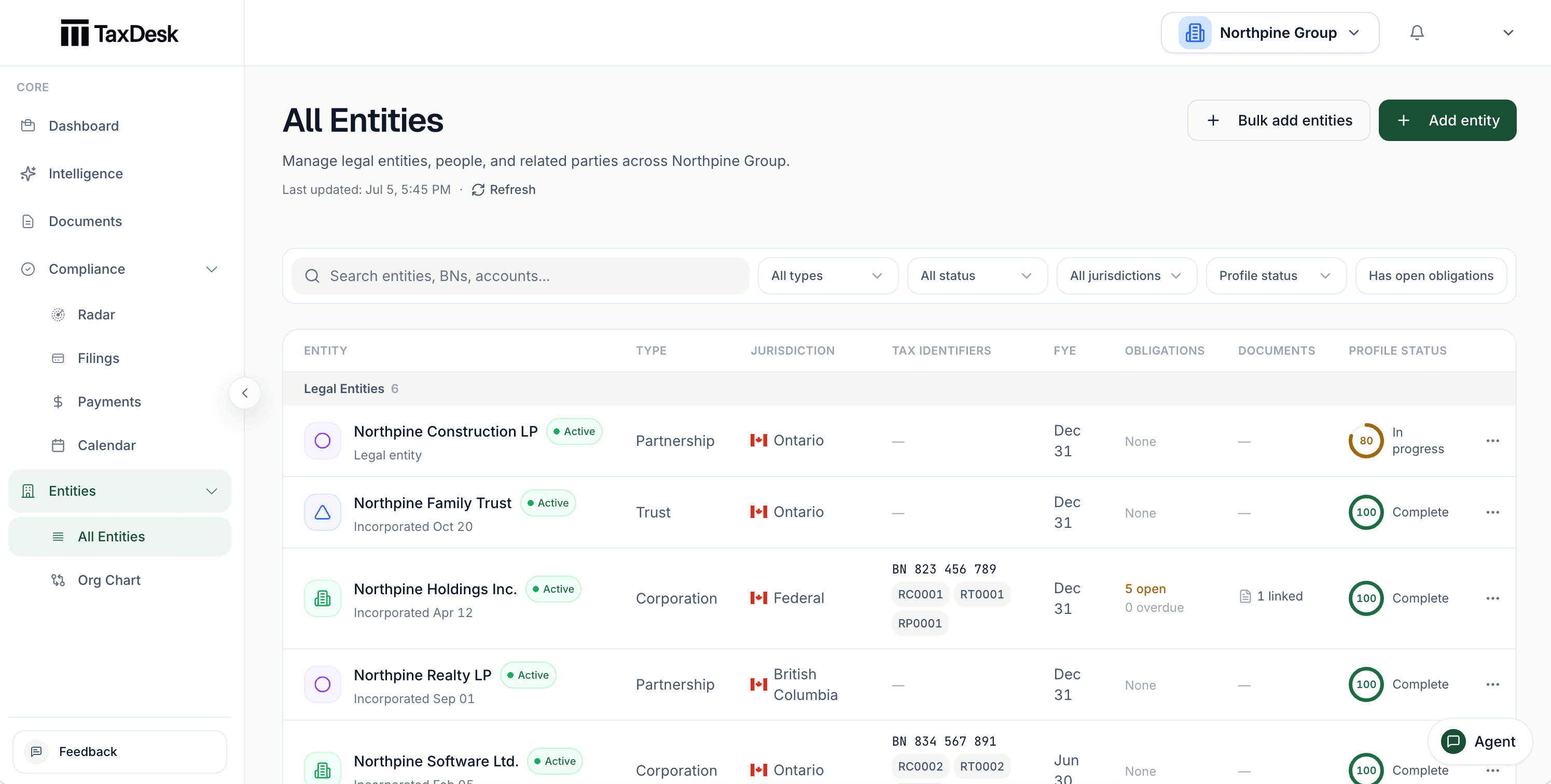
Inside TaxDesk · Companies
Each company shows its business number, CRA accounts, year-end, open work, and linked documents. A status flags what’s incomplete.
Across an engagement
A consistent structure turns onboarding, preparation, and review into repeatable work instead of a project for each client.
A client group joins the firm.
The year’s work is under way.
A reviewer picks up the file.
The engagement renews.
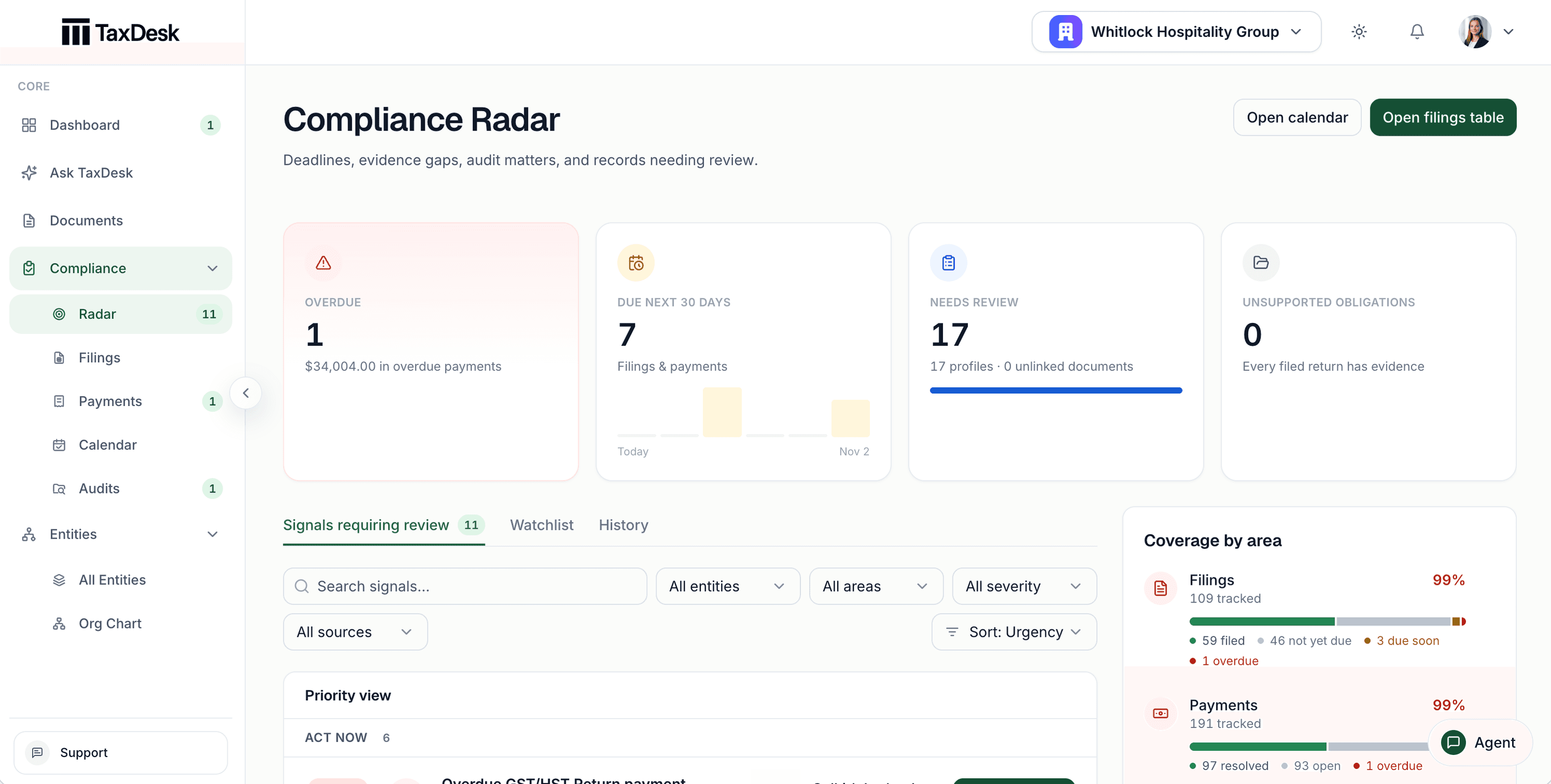
Inside TaxDesk · Review
The compliance radar lists what needs a look, most urgent first. Each item names its company and due date, and coverage is shown for filings, payments, company profiles, and documents.
What’s in the record
Every client workspace holds the same kinds of information in the same places. The record no longer depends on whoever set it up.
Who does what
YouYour firm prepares and files with its usual tools.
TaxDeskTaxDesk records the status, dates, and documents behind each filing.
YouYour firm chooses who’s invited to each workspace, and their role.
TaxDeskEach client group has its own workspace. Staff only see the ones they’re authorized to use.
YouYour reviewer decides on suggested changes.
TaxDeskTaxDesk reads documents and shows each fact with its source, confidence, and status. A fact that conflicts with the record waits for approval.
Who it is for
TaxDesk organizes tax records and work. It isn’t tax-preparation software, and it doesn’t file returns or connect to CRA. Your firm prepares and files with its usual tools.
Free tools and guides
Calculators and guides for groups like yours. They’re planning aids, not tax advice.
Common questions
A firm creates a workspace for each client group and keeps the client’s companies, filings, CRA documents, ownership, and tax balances in the same structure every time. Staff work across the workspaces they’re authorized to use.
Yes. Each client group has its own workspace, and your firm can move between the client workspaces it’s authorized to use.
Yes. Invite staff into the client workspaces they work on, with roles that match their review responsibility.
TaxDesk reads uploaded documents and shows each fact with its source document, confidence, and status. Suggested changes wait in a review queue, and a fact that conflicts with the client’s record only changes once your reviewer approves it.
No. TaxDesk doesn’t prepare or file returns, and it doesn’t connect to CRA. It organizes the client’s tax record and work, and your firm prepares and files with its usual tools.
Firms keep a separate workspace for each client group and pay one firm-wide price, set with us based on the number of client groups you serve. Third parties are free in every client workspace. Request access and tell us about your book.
Request access
Start with one client workspace, see how the information comes together, and add the rest of your book at your own pace.