
A CRA review, run as its own matter.
Record the letter, the requested items, the response date, and the outcome. Link evidence to each item, and keep the letter open beside the work.
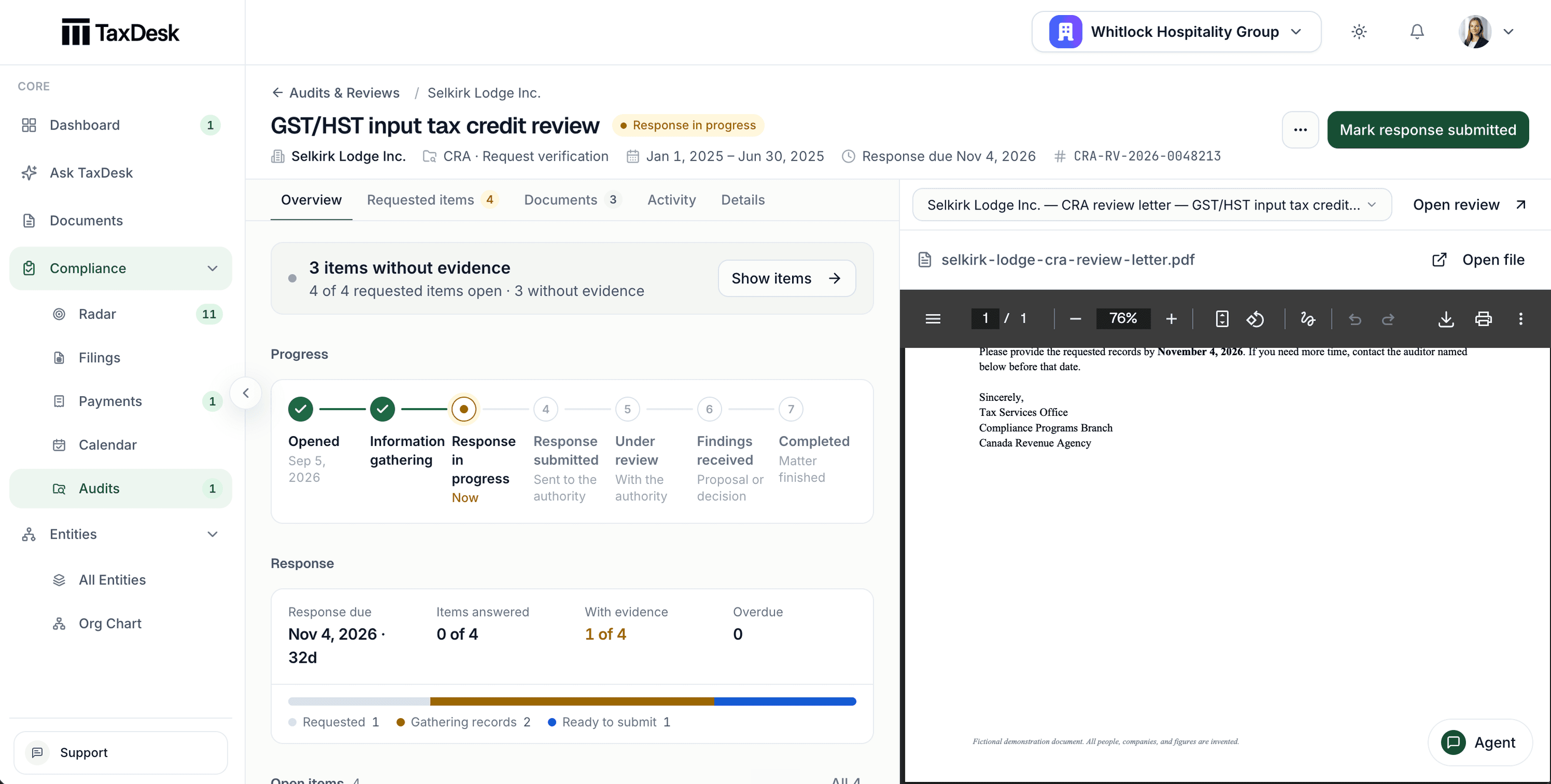
- 1Requested items, linked documents, and activity, on one case
- 2Items with no evidence linked, counted
- 3The review's stage, from opened to completed
- 4The CRA letter, open beside the case
Every request, every document, every stage.
A matter belongs to one entity and, optionally, one program account. It keeps the authority’s reference, the periods under review, the response date, the contact, and a stage from opened to completed, with the date each stage was reached.
- Audits, pre-assessment reviews, processing reviews, and other examinations kept distinct
- Each requested item tracked from gathering to submitted to confirmed
- Evidence linked to the whole matter or to one requested item
Upload the letter. The matter is proposed.
When TaxDesk reads an opening letter or information request, it can propose a matter with the requested items it found. The matter opens only when someone applies it.
Evidence goes straight to the item.
Upload a document from a requested item and it’s filed against that item, not left in the general list.
Archived, not deleted.
A finished or mistaken matter can be archived and restored, with its requests, evidence, and history intact.
A history of every change.
Stage changes and edits are recorded with their dates and before-and-after values.
Response dates that surface on their own.
An overdue response or requested item raises a high-priority signal in Compliance Radar, and one due within 14 days raises a medium one. The matter list sorts into active, needs attention, completed, and archived.
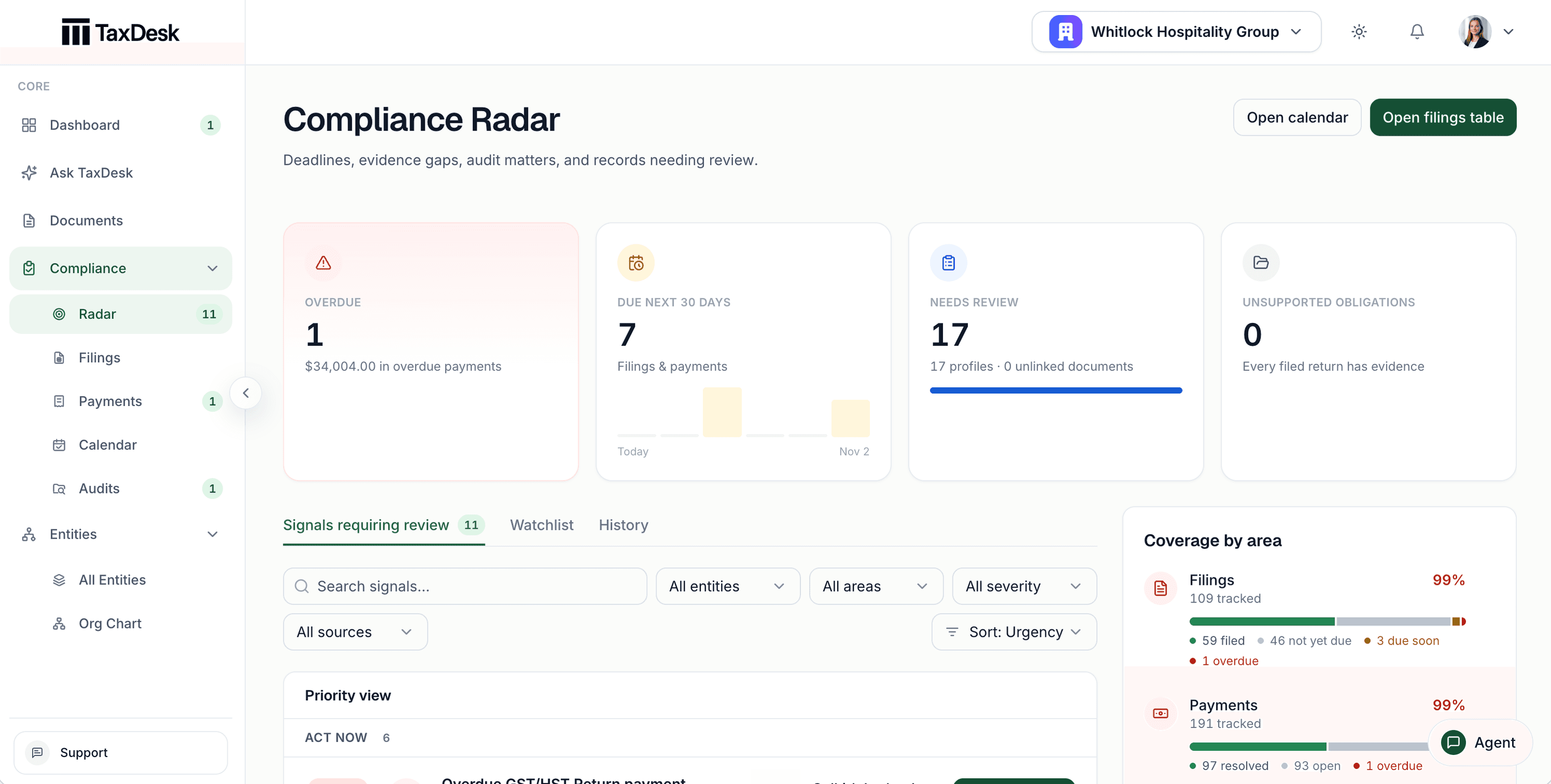
- 1Overdue work, with the amount outstanding
- 2Work due in the next 30 days, day by day
- 3Signals requiring review, a watchlist, and history
- 4Coverage by area: filings, payments, profiles, and documents
Where it stops
TaxDesk keeps the matter. You talk to CRA.
A review is tracked separately from filings, so closing one never marks a return as complete.
- RespondingYou or your advisor respond to the auditor through your usual channels.TaxDesk tracks what was asked, what was sent, and when.
- PositionsYour advisor decides what to concede or dispute.TaxDesk keeps the letters, responses, and outcome together.
- FilingsReassessments are handled the way you handle them today.TaxDesk links the reassessment to the matter and keeps filings separate.
Common questions
Questions about audits and reviews.
Is a review treated as an audit?
No. The matter keeps its type: audit, pre-assessment review, processing review, request for verification, or another examination.
Can we track a provincial review?
Yes. CRA is the default authority, not a requirement. Record the authority that sent the letter.
Does TaxDesk create matters automatically?
It can propose one from an uploaded opening letter or information request. Nothing is created until someone on your team applies it.
Does TaxDesk submit documents to CRA?
No. TaxDesk doesn’t connect to CRA. Record when each requested item was submitted and confirmed, so the matter shows what was sent.
Get started
Know where every review stands.
Tell us about your entities and the reviews you handle, and we’ll follow up by email.