
Every tax balance, with the history behind it.
CDA, GRIP, RDTOH, losses, and CCA are built from dated entries, each with its source. See what a balance was on any date, and why it changed.
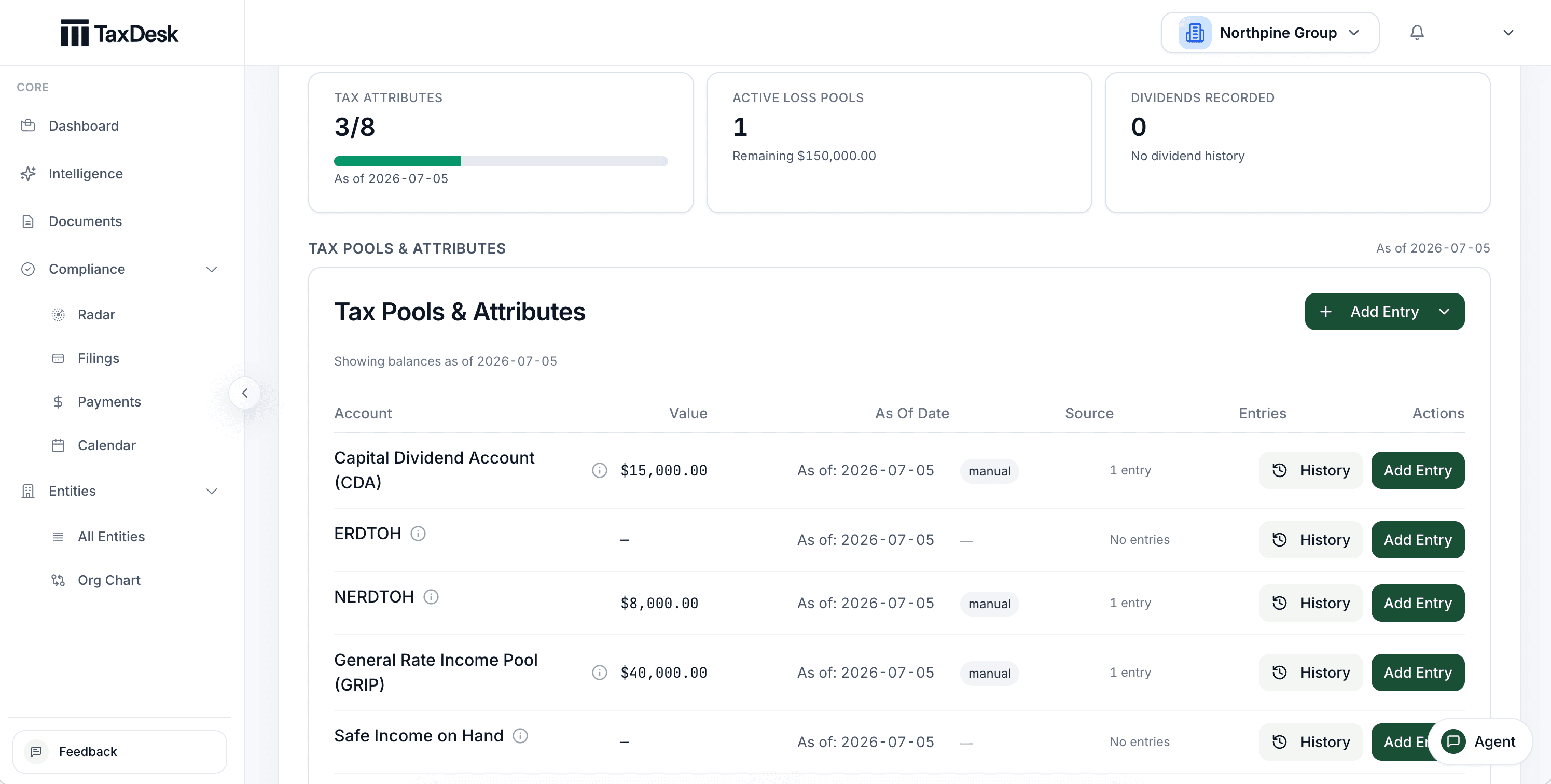
- 1CDA, ERDTOH, and NERDTOH, each with its balance
- 2Each balance carries an as-of date and its source
- 3Open the dated history behind any balance
- 4Balances built from dated entries, drawn as a running history
A balance is the sum of its entries.
Record CDA, ERDTOH, NERDTOH, GRIP, safe income, and other balances as dated entries. Each balance shows its as-of date and source, and opens to the history behind it.
- Entries brought in from a return stay tied to it, and can’t be edited away from their source
- Balances that can’t go below zero are held at zero
- View any balance as of a past date
Losses by year. CCA by class.
Keep non-capital and net capital losses by the year they arose, with each application against income. Keep UCC and CCA by class and tax year, brought in from Schedule 8 or entered by hand.
Remaining balances worked out for you.
A loss pool’s remaining balance, expiry year, and status come from its origin and applications, not from a number someone typed.
Expiry, with its caveat.
Non-capital losses project the standard 20-year carryforward, with a warning that an acquisition of control or another restriction can change it.
Acquisitions and amalgamations.
A guided review sets opening balances with a stated amount, a reason, and whether they’re provisional or final. Later returns can correct provisional figures.
A dividend and its paperwork, together.
Record a dividend with its declaration, payable, and paid dates, share class, and recipients. The related T5, T2054, and NR4 obligations are created or updated with it.
Complete means complete.
A reporting or remittance step can’t be marked done without the facts and evidence it needs, such as the T2054 filing or the withholding remittance.
Pool effects recorded.
A dividend’s effect on the tax pools is recorded as its own entry, linked to the dividend.
Partner positions, derived and explained.
For each partner, TaxDesk derives adjusted cost base, at-risk amount, and limited partnership losses by fiscal period from the partnership’s transactions and allocations.
What the record can’t show is flagged.
Amounts owing, guarantees, and purchase prices aren’t in the partnership ledger, so TaxDesk flags them for review instead of assuming.
Draft T5013 slips.
Partner allocations become draft slip amounts, compared with the slips read from uploaded T5013 returns. Nothing is applied from the comparison.
Where it stops
A dated record of the numbers, not the advice.
TaxDesk keeps balances consistent and sourced. Deciding what a balance should be remains professional work.
- Tax positionsYour advisor confirms balances and decides how they’re used.TaxDesk keeps each entry dated and sourced, and derives partner positions for review.
- ReturnsYour accountant prepares the schedules and files the return.TaxDesk brings schedule figures in from the filed return, with conflicts sent to review.
- DividendsYour board declares dividends and your advisor designates them.TaxDesk records the dividend and keeps its slips and elections on the schedule.
Common questions
Questions about tax balances.
Which balances does TaxDesk track?
CDA, ERDTOH, NERDTOH, GRIP, LRIP, safe income, non-capital and net capital losses, UCC and CCA by class, and, for partnerships, each partner’s ACB, at-risk amount, and limited partnership losses.
Where do the balances come from?
From entries your team records, from filed returns TaxDesk reads (such as Schedule 8 and Schedule 4), and from dividends and loss applications recorded in TaxDesk. Every entry keeps its date and source.
Can we see a balance as it was at year-end?
Yes. Every balance is built from dated entries, so it can be viewed as of any date.
Does TaxDesk calculate our CDA or GRIP for us?
No. TaxDesk records the entries and keeps their history and sources. Your advisor determines the balances. Partner positions are the exception: TaxDesk derives them from the partnership ledger for your review.
Get started
Keep every balance with the history behind it.
Tell us about your entities and how you track their balances today, and we’ll follow up by email.