
Every location has its own year-end.
A T2 is due six months after a corporation’s year-end. Locations opened or bought at different times often end up with different year-ends, so returns come due in different months.
Tax deadlines toolFranchise and multi-location groups
The brand looks like one business. Behind it is usually a company for every location, each with its own year-end, GST/HST schedule, payroll schedule, and CRA mail. TaxDesk gives head office one view of all of it, and keeps every company separate.
A typical multi-location group

Sound familiar?
Without a shared recordThe answer is in five different calendars. Each location has its own year-end, GST/HST schedule, and payroll schedule.
In TaxDeskOne list shows what’s due, filed, paid, or missing at every location. Open any row to reach the location, the period, and the document.
Without a shared recordA new corporation means new CRA accounts and new deadlines. An acquisition also brings a folder of the seller’s returns nobody has time to read.
In TaxDeskAdd the company and its settings, and its work joins the same calendar. For an acquisition, upload the returns. TaxDesk links each fact it finds to its source, and you decide on anything that conflicts.
Without a shared recordIt lands with a manager or an outside bookkeeper. Head office hears after the response date, or never.
In TaxDeskThe notice is filed on that location’s record, and open items show up for head office.
Why it gets complicated
Each location sets its own rhythm. The group inherits all of them.
A T2 is due six months after a corporation’s year-end. Locations opened or bought at different times often end up with different year-ends, so returns come due in different months.
Tax deadlines toolA location files monthly, quarterly, or annually depending on its revenue and any election it has made. Two locations under one brand often file on different schedules.
GST/HST operating guideEach location with employees has its own payroll account. How often it remits depends on its average withholdings, so the account and the remitter type both need to be on record.
Corporate tax obligationsCorporations under common control are generally associated, and they share one small business limit. Your accountant decides how to split it. The record should show every company in the group.
Corporate tax ratesThis is general information, not tax or legal advice. Ask your accountant how these rules apply to your group.
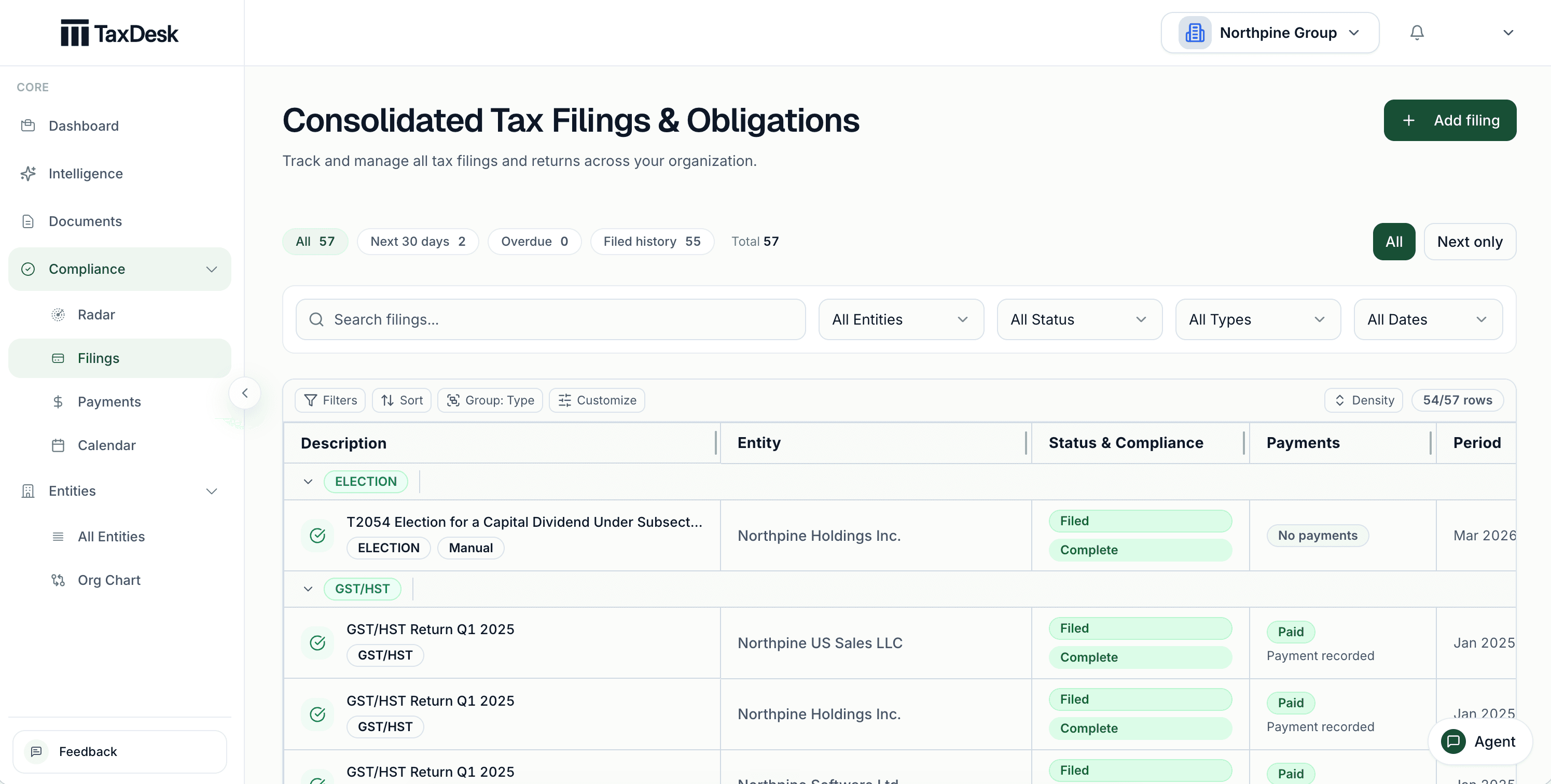
Inside TaxDesk · Filings
Filings are grouped by program, and each carries a status and a recorded payment outcome. Head office sees upcoming and overdue work counted across the group, then opens the location that needs attention.
The rhythm of a group
This is what one brand’s deadlines look like when every location is its own company. Each mark is a filing or remittance someone has to track.
85 dates a year across 5 entities
| Entity | Jan | Feb | Mar | Apr | May | Jun | Jul | Aug | Sep | Oct | Nov | Dec |
|---|---|---|---|---|---|---|---|---|---|---|---|---|
| Location 01 Inc.Dec year-end · GST/HST monthly · payroll regular | GST/HST return in Janpayroll remittance in Jan | GST/HST return in Febpayroll remittance in Feb | GST/HST return in Marpayroll remittance in Mar | GST/HST return in Aprpayroll remittance in Apr | GST/HST return in Maypayroll remittance in May | T2 filing in JunGST/HST return in Junpayroll remittance in Jun | GST/HST return in Julpayroll remittance in Jul | GST/HST return in Augpayroll remittance in Aug | GST/HST return in Seppayroll remittance in Sep | GST/HST return in Octpayroll remittance in Oct | GST/HST return in Novpayroll remittance in Nov | GST/HST return in Decpayroll remittance in Dec |
| Location 02 Inc.Jun year-end · GST/HST quarterly · payroll regular | GST/HST return in Janpayroll remittance in Jan | payroll remittance in Feb | payroll remittance in Mar | GST/HST return in Aprpayroll remittance in Apr | payroll remittance in May | payroll remittance in Jun | GST/HST return in Julpayroll remittance in Jul | payroll remittance in Aug | payroll remittance in Sep | GST/HST return in Octpayroll remittance in Oct | payroll remittance in Nov | T2 filing in Decpayroll remittance in Dec |
| Location 03 Inc.Sep year-end · GST/HST quarterly · payroll quarterly | GST/HST return in Janpayroll remittance in Jan | T2 filing in Mar | GST/HST return in Aprpayroll remittance in Apr | GST/HST return in Julpayroll remittance in Jul | GST/HST return in Octpayroll remittance in Oct | |||||||
| Location 04 Inc.Mar year-end · GST/HST monthly · payroll regular | GST/HST return in Janpayroll remittance in Jan | GST/HST return in Febpayroll remittance in Feb | GST/HST return in Marpayroll remittance in Mar | GST/HST return in Aprpayroll remittance in Apr | GST/HST return in Maypayroll remittance in May | GST/HST return in Junpayroll remittance in Jun | GST/HST return in Julpayroll remittance in Jul | GST/HST return in Augpayroll remittance in Aug | T2 filing in SepGST/HST return in Seppayroll remittance in Sep | GST/HST return in Octpayroll remittance in Oct | GST/HST return in Novpayroll remittance in Nov | GST/HST return in Decpayroll remittance in Dec |
| Realco Inc.Dec year-end · GST/HST quarterly · payroll quarterly | GST/HST return in Janpayroll remittance in Jan | GST/HST return in Aprpayroll remittance in Apr | T2 filing in Jun | GST/HST return in Julpayroll remittance in Jul | GST/HST return in Octpayroll remittance in Oct |
Illustrative. Counts T2 filings, GST/HST returns, and payroll remittances only. Instalments, T4s, and other work add more.
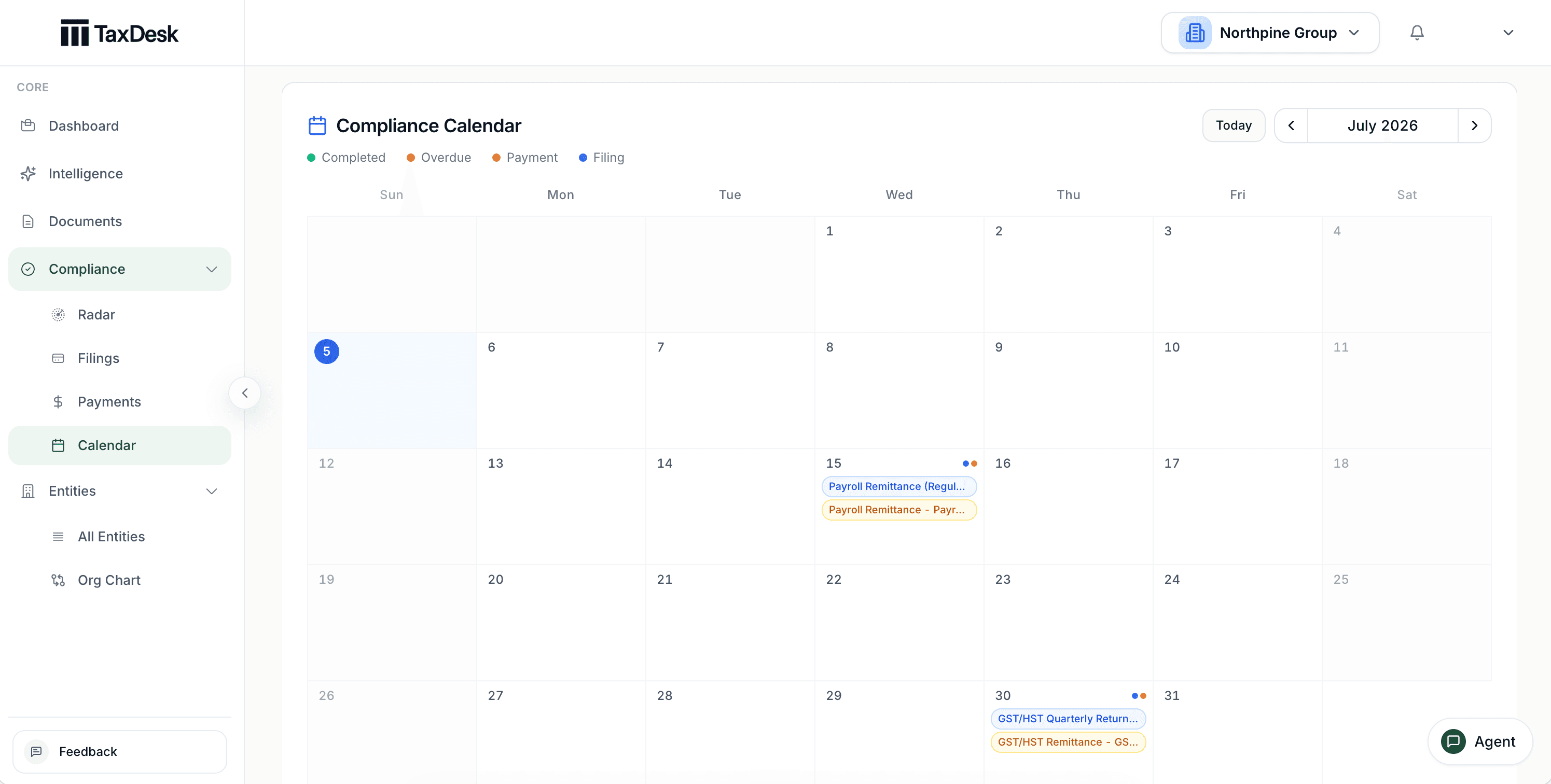
Inside TaxDesk · Calendar
Filing and payment tasks sit on the dates they’re due, colour-coded by type and status. Different year-ends and schedules appear on one page instead of five spreadsheets.
What’s in the record
TaxDesk keeps each company’s deadlines and documents separate, and gives head office one place to review the work. Start with the group, then open the location that needs attention.
Who does what
YouYou or your accountant prepare and file the way you do today.
TaxDeskTaxDesk records the status, dates, and documents behind each filing.
YouYou enter each company’s CRA accounts and filing settings.
TaxDeskTaxDesk turns them into due dates. It doesn’t connect to CRA.
YouYou decide when a document disagrees with the record.
TaxDeskTaxDesk links each fact to its source. A fact that conflicts with your records waits for your approval.
Who it is for
TaxDesk helps your team keep the group’s tax records. It doesn’t manage franchise sales, store operations, payroll, or consolidated financials.
Free tools and guides
Calculators and guides for groups like yours. They’re planning aids, not tax advice.
Common questions
Give each location its own record with its business number, CRA accounts, year-end, GST/HST schedule, and payroll schedule. TaxDesk turns those settings into due dates and shows every location’s work in one view, so head office can see what’s due, filed, paid, or missing.
Yes. Each keeps its own record. Head office sees filings, payments, documents, ownership, and open work across all of them.
Yes. Year-ends, GST/HST schedules, and payroll schedules are set for each company, and the calendar shows every location’s dates together.
No. TaxDesk doesn’t manage franchise operations, sales, or payroll. It keeps the Canadian corporate tax records and deadlines behind a multi-location group.
Yes. Invite your accounting firm to work from the same record. The firm still prepares and files the returns.
No. TaxDesk doesn’t connect to CRA. You and your accountant file the way you do today, and TaxDesk records the status, dates, and documents behind each filing.
Request access
Tell us about your companies and the tax work you want in one place.