
Year-ends don’t line up.
Companies started or bought at different times keep different year-ends, and an acquisition of control generally ends the acquired company’s tax year. Each T2 comes due on its own date.
Tax deadlines toolHospitality groups
A hospitality group often runs each lodge, restaurant, and seasonal business through its own company, with a property company that owns the buildings and a family trust or Holdco at the top. TaxDesk keeps each company’s year-end, GST/HST, payroll, CCA, losses, and CRA reviews on its own record, and shows the whole group at once.
A typical hospitality group

Sound familiar?
Without a shared recordControl changes hands. The company’s tax year, losses, and CRA accounts all need a second look, and the seller’s returns arrive as a folder of PDFs.
In TaxDeskA guided review works through the entities, tax years, and CRA accounts affected before the new structure is finalized. Upload the seller’s returns, and TaxDesk links each fact it finds to its source.
Without a shared recordThe letter lists invoices and leases to send by a date. The items get chased by email, and nobody can say which ones went out.
In TaxDeskRecord the review as its own case, with the requested items, response date, linked documents, and outcome.
Without a shared recordIt’s a new company with new CRA accounts, its own year-end, and a first-year loss that matters for years.
In TaxDeskAdd the company and its settings, and its work joins the same list. Its loss pool is kept by year, with each later application against income.
Why it gets complicated
Separate companies for the lodge, the kitchen, the buildings, and the seasonal work make sense. Each one adds its own calendar and history.
Companies started or bought at different times keep different year-ends, and an acquisition of control generally ends the acquired company’s tax year. Each T2 comes due on its own date.
Tax deadlines toolAn LP with an outside partner can file its own T5013 information return, and each partner reports its share. Both sides need to be on record, along with who held what.
Entity types and their obligationsWhen a property company leases the buildings to the operating companies, each side records the same rent. Their records should agree, and each side needs its documents.
Shareholder and intercompany loansFurniture and kitchen equipment build UCC balances by CCA class that carry forward year to year. A new property’s early losses can carry forward too, and an acquisition of control can limit their use.
CDA, GRIP, RDTOH and lossesThis is general information, not tax or legal advice. Ask your accountant how these rules apply to your group.
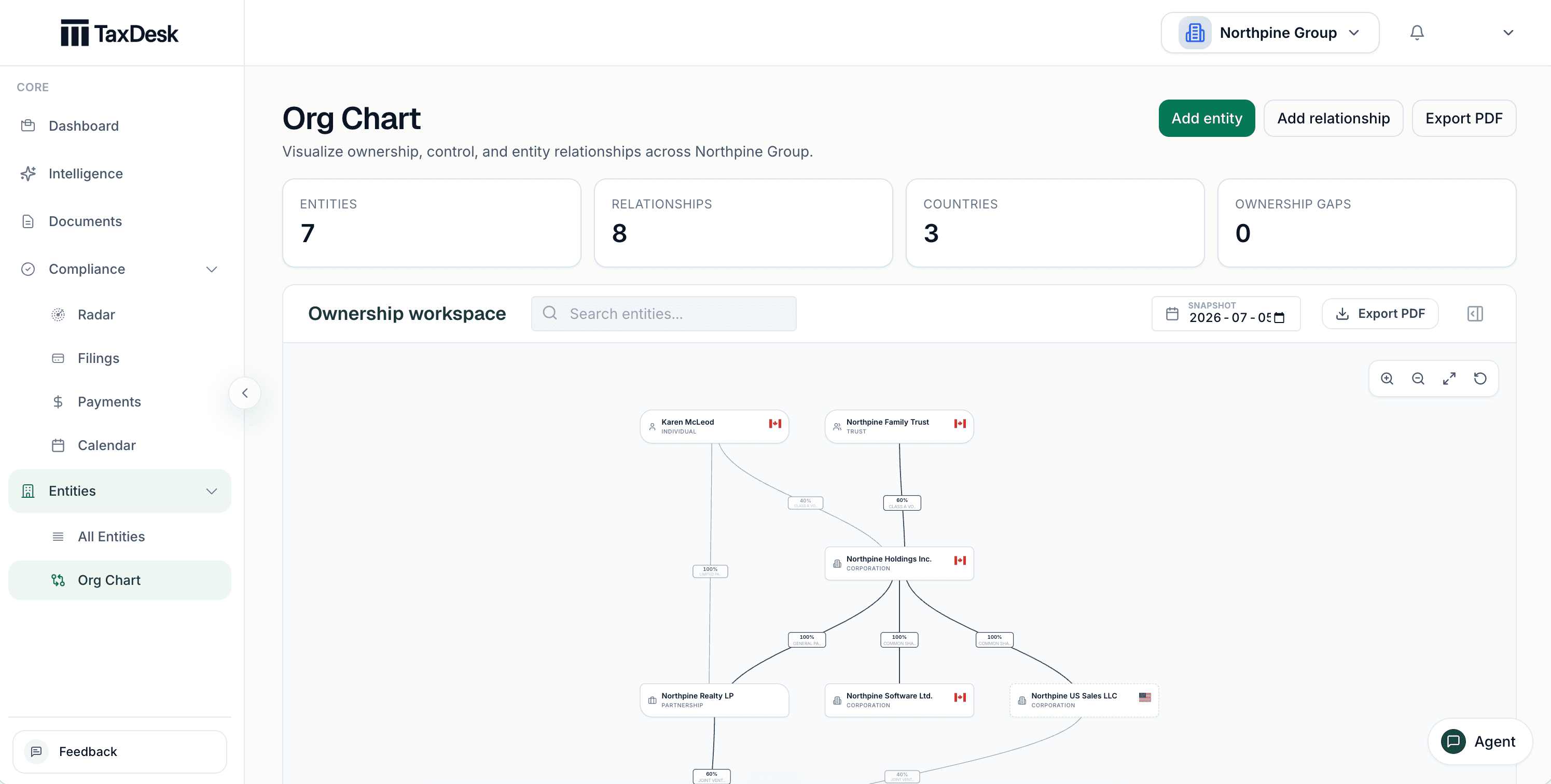
Inside TaxDesk · Ownership
The ownership chart shows people, trusts, corporations, and partnerships with their percentages. See it as of any date, and export it as a PDF for a lender or a buyer.
The rhythm of a group
This is what the deadlines look like when each business is its own company. Each mark is a filing or remittance someone has to track.
60 dates a year across 4 entities
| Entity | Jan | Feb | Mar | Apr | May | Jun | Jul | Aug | Sep | Oct | Nov | Dec |
|---|---|---|---|---|---|---|---|---|---|---|---|---|
| Lodge Inc.Oct year-end · GST/HST quarterly · payroll regular | GST/HST return in Janpayroll remittance in Jan | payroll remittance in Feb | payroll remittance in Mar | T2 filing in AprGST/HST return in Aprpayroll remittance in Apr | payroll remittance in May | payroll remittance in Jun | GST/HST return in Julpayroll remittance in Jul | payroll remittance in Aug | payroll remittance in Sep | GST/HST return in Octpayroll remittance in Oct | payroll remittance in Nov | payroll remittance in Dec |
| Restaurant Group Inc.Mar year-end · GST/HST quarterly · payroll regular | GST/HST return in Janpayroll remittance in Jan | payroll remittance in Feb | payroll remittance in Mar | GST/HST return in Aprpayroll remittance in Apr | payroll remittance in May | payroll remittance in Jun | GST/HST return in Julpayroll remittance in Jul | payroll remittance in Aug | T2 filing in Seppayroll remittance in Sep | GST/HST return in Octpayroll remittance in Oct | payroll remittance in Nov | payroll remittance in Dec |
| Seasonal Rentals Ltd.Apr year-end · GST/HST quarterly · payroll quarterly | GST/HST return in Janpayroll remittance in Jan | GST/HST return in Aprpayroll remittance in Apr | GST/HST return in Julpayroll remittance in Jul | T2 filing in OctGST/HST return in Octpayroll remittance in Oct | ||||||||
| Second Lodge Inc.Dec year-end · GST/HST quarterly · payroll regular | GST/HST return in Janpayroll remittance in Jan | payroll remittance in Feb | payroll remittance in Mar | GST/HST return in Aprpayroll remittance in Apr | payroll remittance in May | T2 filing in Junpayroll remittance in Jun | GST/HST return in Julpayroll remittance in Jul | payroll remittance in Aug | payroll remittance in Sep | GST/HST return in Octpayroll remittance in Oct | payroll remittance in Nov | payroll remittance in Dec |
Illustrative. Counts T2 filings, GST/HST returns, and payroll remittances only. Instalments, T4s, and other work add more.
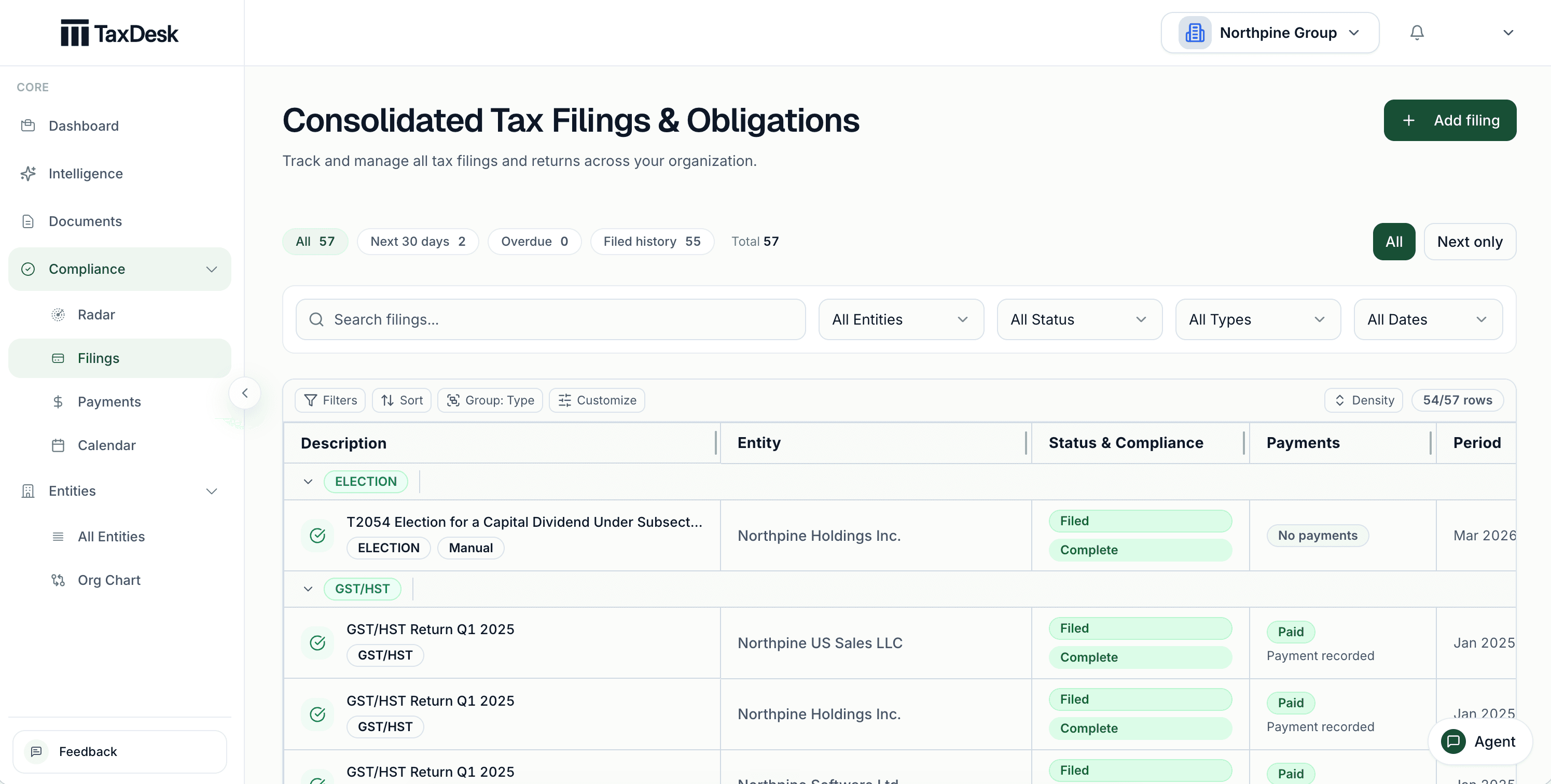
Inside TaxDesk · Filings
Filings are grouped by program, and each carries a status and a recorded payment outcome. See upcoming and overdue work across the group, then open the company that needs attention.
What’s in the record
TaxDesk connects the trust, the Holdco, the companies, and the partnership through ownership, and keeps each one’s deadlines, balances, and documents on its own record. Start with the group, then open the exact filing, case, or document behind any item.
Who does what
YouYou or your accountant prepare and file the way you do today.
TaxDeskTaxDesk records the status, dates, and documents behind each filing.
YouYou enter each company’s CRA accounts and filing settings.
TaxDeskTaxDesk turns them into due dates. It doesn’t connect to CRA.
YouYou decide when a document disagrees with the record.
TaxDeskTaxDesk links each fact to its source. A fact that conflicts with your records waits for your approval.
Who it is for
TaxDesk keeps the group’s corporate tax record. It doesn’t run reservations, point of sale, payroll, or bookkeeping, and it doesn’t prepare returns.
Free tools and guides
Calculators and guides for groups like yours. They’re planning aids, not tax advice.
Common questions
Give each company, trust, and partnership its own record, then connect them through ownership. Each record holds its CRA accounts, year-end, GST/HST and payroll settings, filings, payments, balances, and documents. One view shows the work across all of them.
Yes. Year-ends, GST/HST schedules, and payroll schedules are set for each company, and the group’s filings and payments appear together.
Yes. The partnership has its own record with its partners, their interests, and income allocations. Its T5013 return can be uploaded and read like any other document. Your accountant still prepares and files it.
A guided review works through the entities, tax years, and CRA accounts affected by the acquisition of control. Upload the seller’s returns and notices, and anything that conflicts with your records waits for approval.
No. TaxDesk keeps the corporate tax record for the companies behind the business. It doesn’t manage bookings, sales, staff scheduling, or payroll processing.
No. TaxDesk doesn’t connect to CRA. You and your accountant file the way you do today, and TaxDesk records the status, dates, and documents behind each filing.
Request access
Tell us about your companies and the tax work you want in one place.