
A trust is its own taxpayer.
A trust files its own T3 return, generally due with any balance owing 90 days after its year-end. Its income, allocations, and transactions need their own record.
Entity types and their obligationsFamily holdings and trusts
A family business is often held through a trust and a Holdco, set up years ago around an estate freeze. TaxDesk keeps the trust’s beneficiaries and T3 work, the share history, the Holdco’s tax balances, and the dates that matter, in one record the family and its advisors share.
A typical family holding structure
Sound familiar?
Without a shared recordThe T3 needs the trust’s income, what went to each beneficiary, and the Schedule 15 details. They’re spread across dividend records, a lawyer’s file, and last year’s return.
In TaxDeskThe trust’s beneficiaries, interest classes, income, and transactions are on its own record, beside the companies whose dividends it received. Its T3 and balance due are on the same list as everything else.
Without a shared recordNobody is watching the date, and the planning it calls for takes time with your advisors.
In TaxDeskTaxDesk works out the trust’s next deemed-disposition date from its type and creation date, and shows it on the trust’s profile.
Without a shared recordThe answer sits in a trust deed, two share registers, and the memory of the person who set it up.
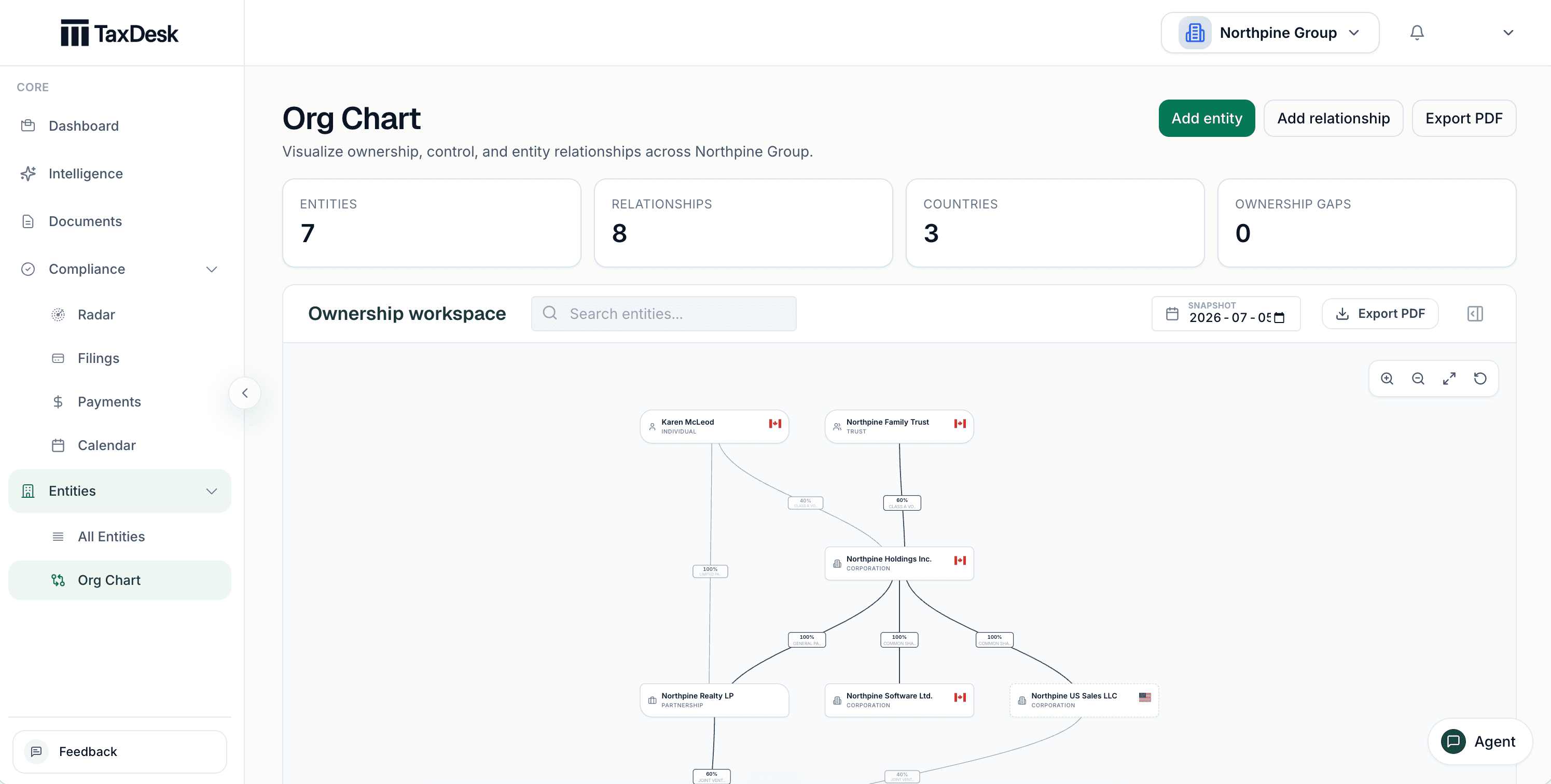
In TaxDeskThe ownership chart shows the trust, the companies, and the family, with the date each change took effect. Export it for the family meeting or the lawyer.
Why it gets complicated
Trusts and Holdcos are set up for good reasons, usually once. The reporting, the dates, and the history keep going every year after.
A trust files its own T3 return, generally due with any balance owing 90 days after its year-end. Its income, allocations, and transactions need their own record.
Entity types and their obligationsMost trusts that file a T3 must also report every trustee, settlor, beneficiary, and controlling person on Schedule 15, each year, even when nothing has changed.
Most personal trusts are treated as disposing of their capital property at fair market value every 21 years. The date is easy to miss when the deed is in a drawer.
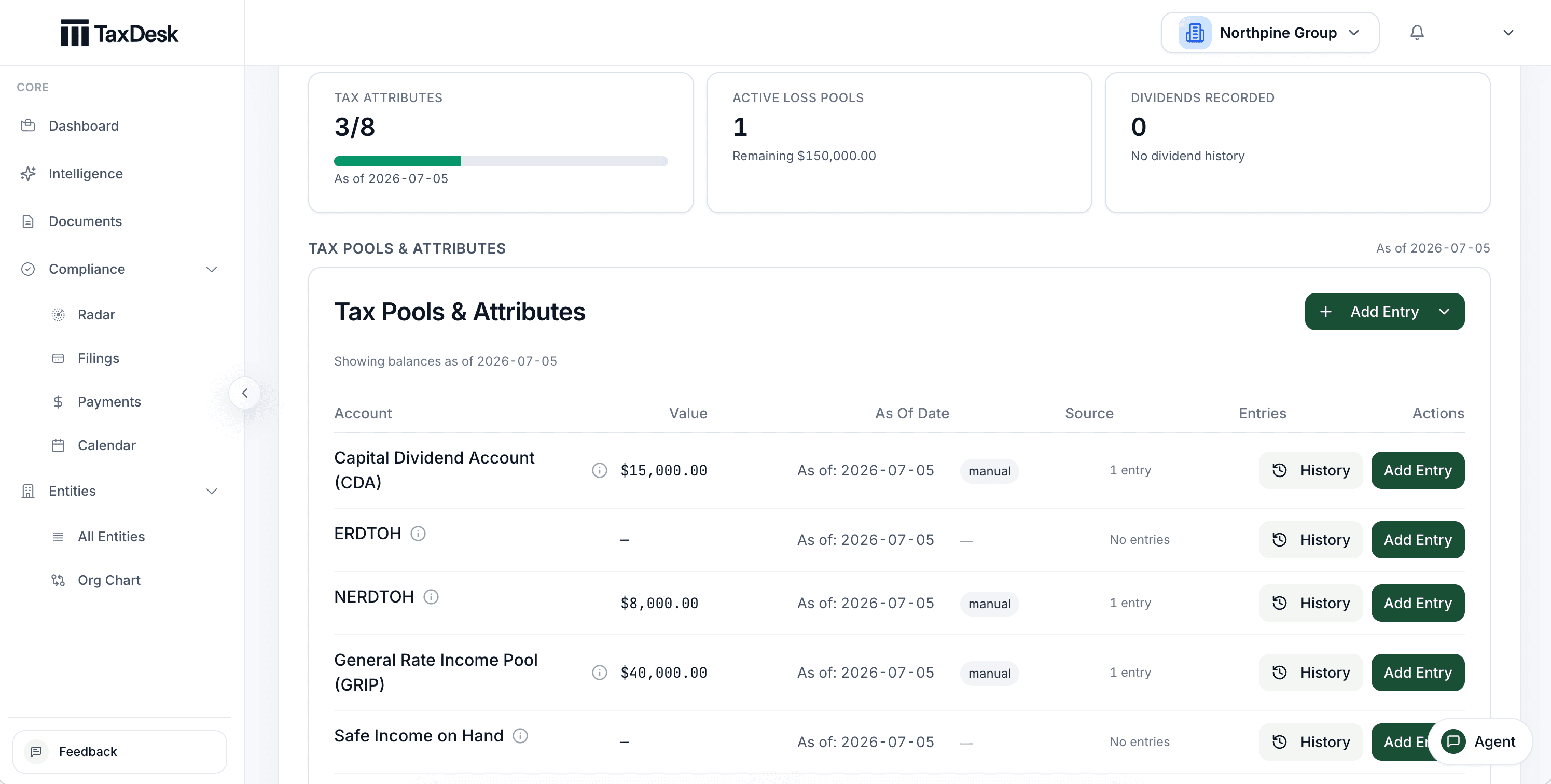
CDA, GRIP, and RDTOH affect how dividends from a Holdco are paid and taxed. Each balance is only as reliable as the record of where it came from.
CDA, GRIP, RDTOH and lossesThis is general information, not tax or legal advice. Ask your accountant how these rules apply to your group.
Inside TaxDesk · Ownership
The ownership chart shows people, trusts, corporations, and partnerships with their percentages. See it as of any date, and export it for the family or the lawyer.
Over a generation
A family structure changes rarely, but each change matters for decades. The record should hold the reason and the date.
The founder owns the company.
A family trust takes the growth shares.
Dividends flow and the trust files.
The deemed-disposition date approaches.
Inside TaxDesk · Tax balances
CDA, ERDTOH, NERDTOH, GRIP, and safe income are built from dated entries with their sources. Open any balance to see how it got there.
What’s in the record
The trust and each company keep their own returns, balances, and documents, and ownership connects them. The family’s accountant and lawyer can work from the same record, and it stays with the family when advisors change.
Who does what
YouYou or your accountant prepare and file the way you do today.
TaxDeskTaxDesk records the status, dates, and documents behind each filing.
YouYou enter each company’s CRA accounts and filing settings.
TaxDeskTaxDesk turns them into due dates. It doesn’t connect to CRA.
YouYou decide when a document disagrees with the record.
TaxDeskTaxDesk links each fact to its source. A fact that conflicts with your records waits for your approval.
Who it is for
TaxDesk keeps the tax record for the trust and the companies. It doesn’t prepare T3 or T2 returns, manage investments, or replace legal advice about the trust.
Free tools and guides
Calculators and guides for groups like yours. They’re planning aids, not tax advice.
Common questions
Yes. A trust has its own record with its beneficiaries, interest classes, income, and transactions. Its T3 return and balance due appear with the rest of the group’s filings, and its 21-year date is on its profile.
No. Your accountant prepares and files the return. TaxDesk keeps the information the return draws on, with the documents behind it.
From the trust’s type and creation date. Trusts the rule doesn’t apply to, such as RRSP and TFSA trusts, get no date. Whether and how to plan for it is a decision for your advisor.
Yes. Invite them to the workspace with a role that fits their work. If an advisor changes, the record stays with the family.
No. TaxDesk keeps the tax record for the trust and the companies. It doesn’t hold, value, or trade investments.
Request access
Tell us about your companies and the tax work you want in one place.