
Who owns what, who signs, and how it changed.
Record share, partnership, and trust transactions, and TaxDesk keeps the cap table, the ownership chart, and each holder’s position current. Directors, officers, and signing authorities sit beside them with their dates.
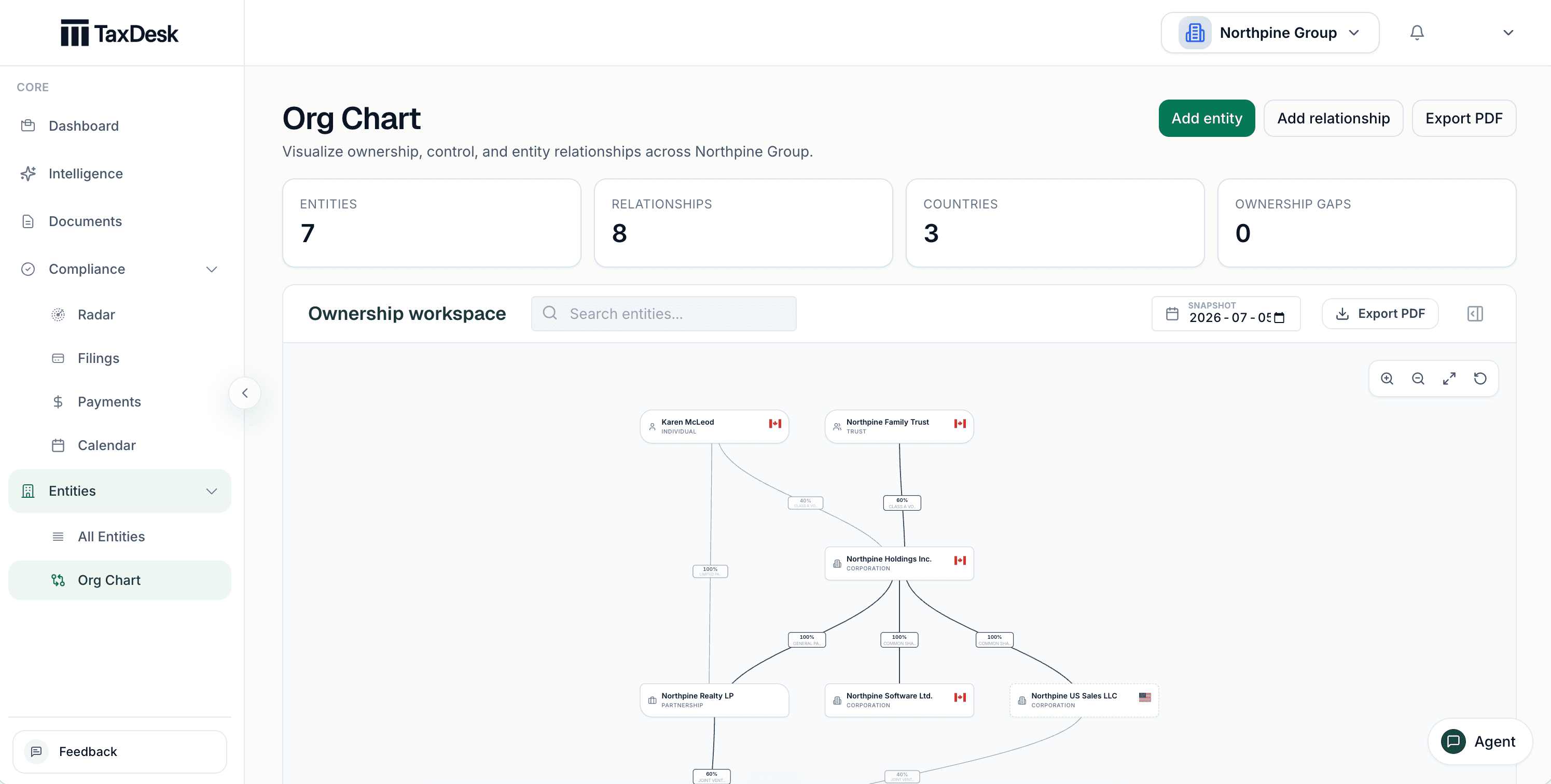
- 1View the structure as of a date
- 2Export the chart
- 3Individuals, trusts, and corporations on one chart
- 4Ownership percentage on every link
The whole structure, on one chart.
Individuals, trusts, corporations, and partnerships appear with the percentage on every link. View the structure as of a date, and export it as a PDF, PNG, or SVG for a lender, a buyer, or your working papers.
Open any entity from the chart.
Select an entity to see its country, jurisdiction, fiscal year-end, and each owner with the class it holds. Focus the chain to follow ownership up or down.
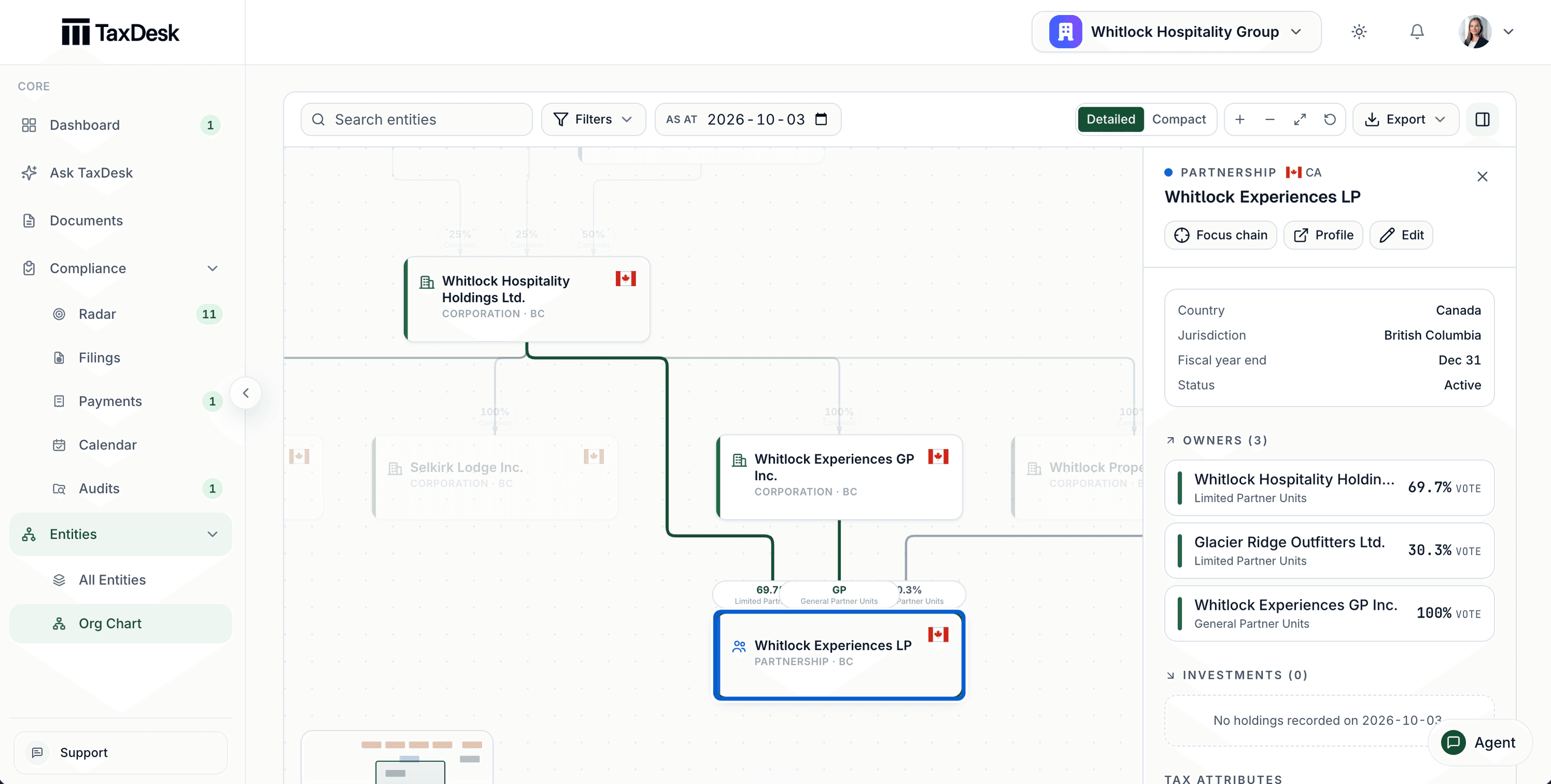
- 1Focus the ownership chain, open the profile, or edit
- 2Country, jurisdiction, fiscal year-end, and status
- 3Each owner, with the class it holds
Outside parties kept for context.
Mark an outside investor or counterparty as external. It stays on the chart and in the ownership math, without adding filings, reminders, or setup tasks.
Reported ownership kept separate.
Shareholders listed on a return are kept as dated, reported ownership for review. They never overwrite the cap table.
Ownership follows the transactions.
Record issues, transfers, and redemptions, and TaxDesk calculates current shareholdings, ownership within each class, PUC, and ACB. Voting percentages appear when the share class facts make them determinable.
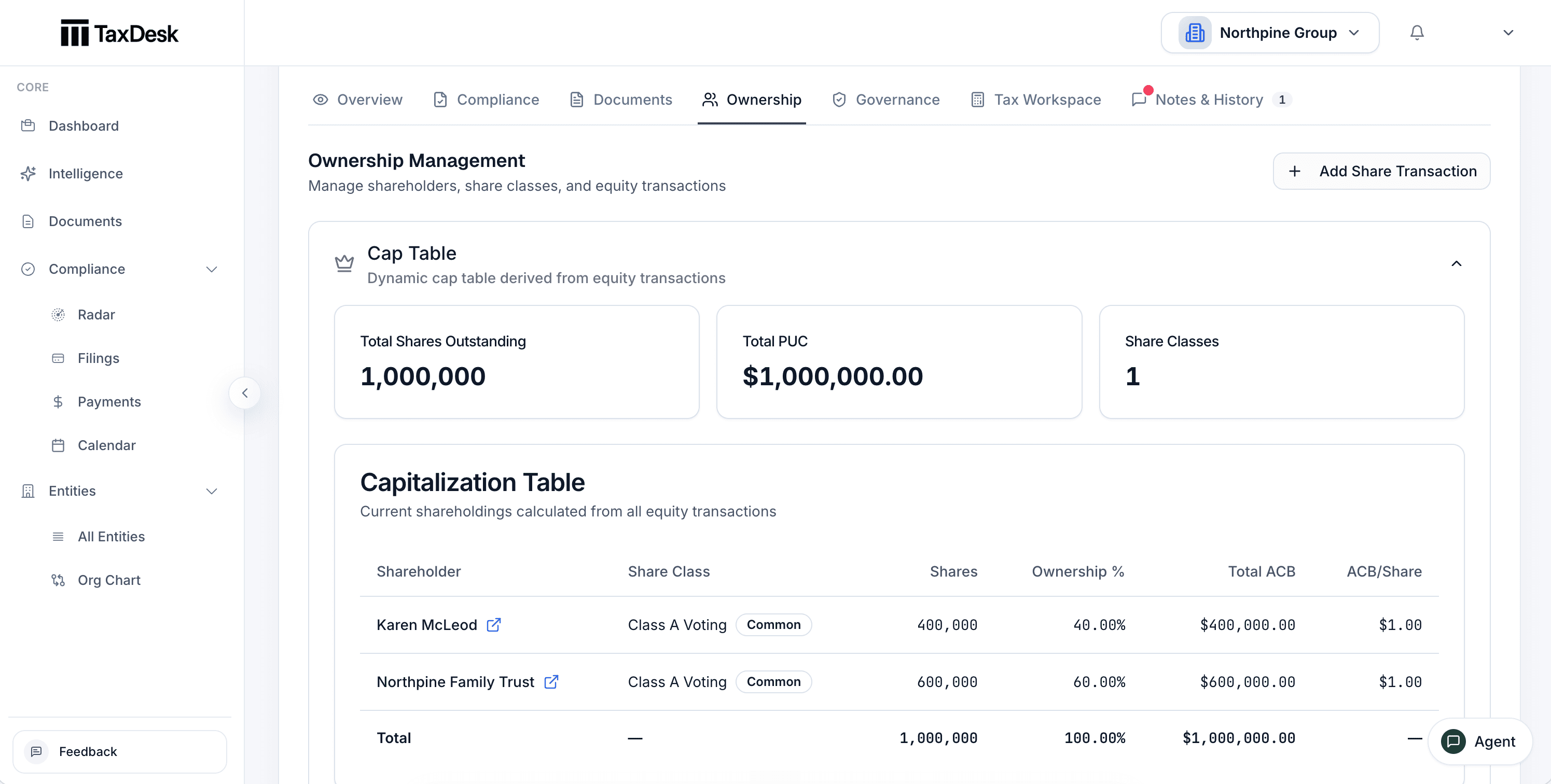
- 1Ownership, governance, and notes sit on the entity
- 2Changes come from recorded share transactions
- 3Shares outstanding, total PUC, and share classes
- 4Shareholders, classes, ownership percentage, and ACB
Every share transaction, on one ledger.
Review transactions by date, filter by type and class, and export the ledger as CSV or PDF.
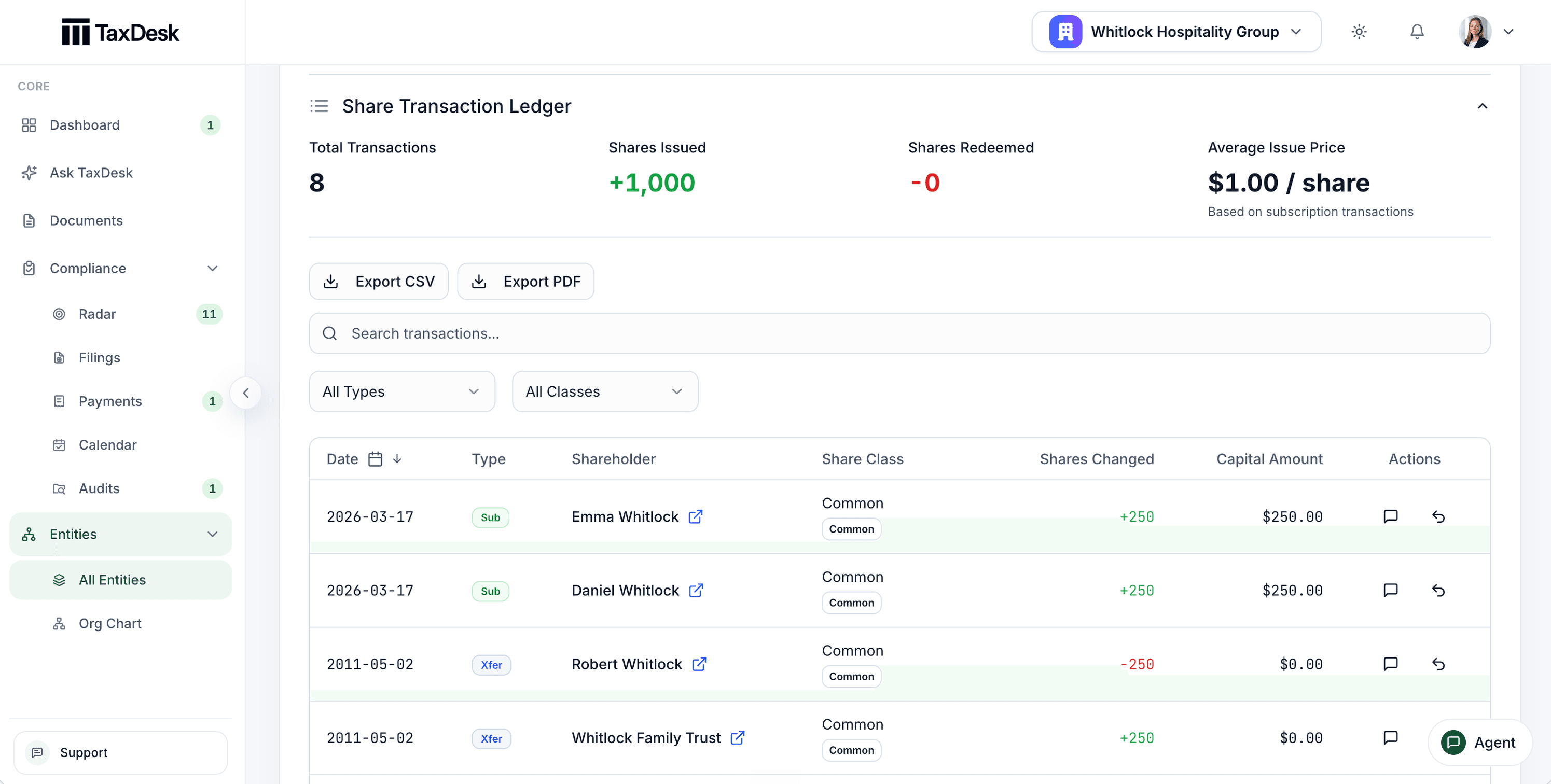
- 1Transactions, shares issued and redeemed, and average issue price
- 2Export the ledger as CSV or PDF
- 3Filter by type and share class
- 4Every transaction with its shareholder, class, shares, and capital
Corrections leave a trail.
A posted transaction isn’t edited. A correction posts a reversal, so the history stays readable.
Impossible positions are refused.
A transaction that would leave a holder with negative shares, PUC, or ACB at any point in its history is rejected.
Partners, units, beneficiaries, and the dates that matter.
Partnerships keep their interest classes, partner transactions, and income allocations by fiscal period. Trusts keep their beneficiaries, interest classes, income, and transactions.
Allocations by days held.
Allocate a partnership’s income by the units each partner held on each day of the period, so partners who join or leave partway through get their share. Preview it before it replaces anything.
Partner positions derived from the ledger.
Each partner’s ACB, at-risk amount, and limited partnership losses are derived from transactions and allocations. Negative ACB is flagged for review.
The trust’s 21-year date.
TaxDesk works out the next deemed-disposition date from the trust’s type and creation date, and leaves out trusts the rule doesn’t apply to.
T3 Schedule 15 information.
The trust’s beneficiaries and the people behind it are kept in one place for its T3 beneficial ownership reporting.
Directors, officers, and who can sign.
Record each role holder once, with their roles and appointment dates. The authority register shows who can sign for what, and the decision log reads every appointment, update, and removal by date.
Gaps flagged.
A role with no appointment date, or an authority line with no holder, is flagged.
Every removal logged.
Appointments, changes, and removals all appear in the entity’s history, with who made them.
Where it stops
The tax view of ownership, not the minute book.
TaxDesk keeps ownership and governance as the tax work needs them, with the documents behind each change.
- Corporate recordsYour lawyer keeps the minute book and makes corporate registry filings.TaxDesk keeps the cap table, roles, and dates, with the supporting documents linked.
- Tax consequencesYour advisor decides how a transaction is treated for tax.TaxDesk records the transaction and keeps PUC, ACB, and partner positions consistent with it.
- ChangesYour team records transactions and role changes.TaxDesk validates each one and logs it in the entity’s history.
Common questions
Questions about ownership and governance.
Can we see the structure as it was on a past date?
Yes. The ownership chart and partnership cap tables can be viewed as of a date, built from what was recorded up to then. Tax balances can be too.
How does TaxDesk calculate ownership percentages?
From recorded transactions, within each share class. Percentages in different classes aren’t added together, and voting percentages appear only when the share class facts determine them.
Does TaxDesk handle partnerships and trusts?
Yes. Partnerships have interest classes, partner transactions, allocations by fiscal period, and derived partner positions. Trusts have beneficiaries, interest classes, income, and transactions, plus their 21-year date.
Is this our official minute book or ISC register?
No. TaxDesk keeps the tax view of ownership and governance. Your corporate records stay with your lawyer; you can link the documents to the entity.
Can we export the chart?
Yes, as a PDF, PNG, or SVG. The share ledger exports as CSV or PDF.
Get started
Put the structure and its history in one place.
Tell us about your group’s entities and owners, and we’ll follow up by email.