
Every return and notice, read and filed where it belongs.
Upload returns, CRA notices, financial statements, and corporate records. TaxDesk recognizes about 50 Canadian document types, files each one to its entity and year, and links every fact it finds to the page it came from.
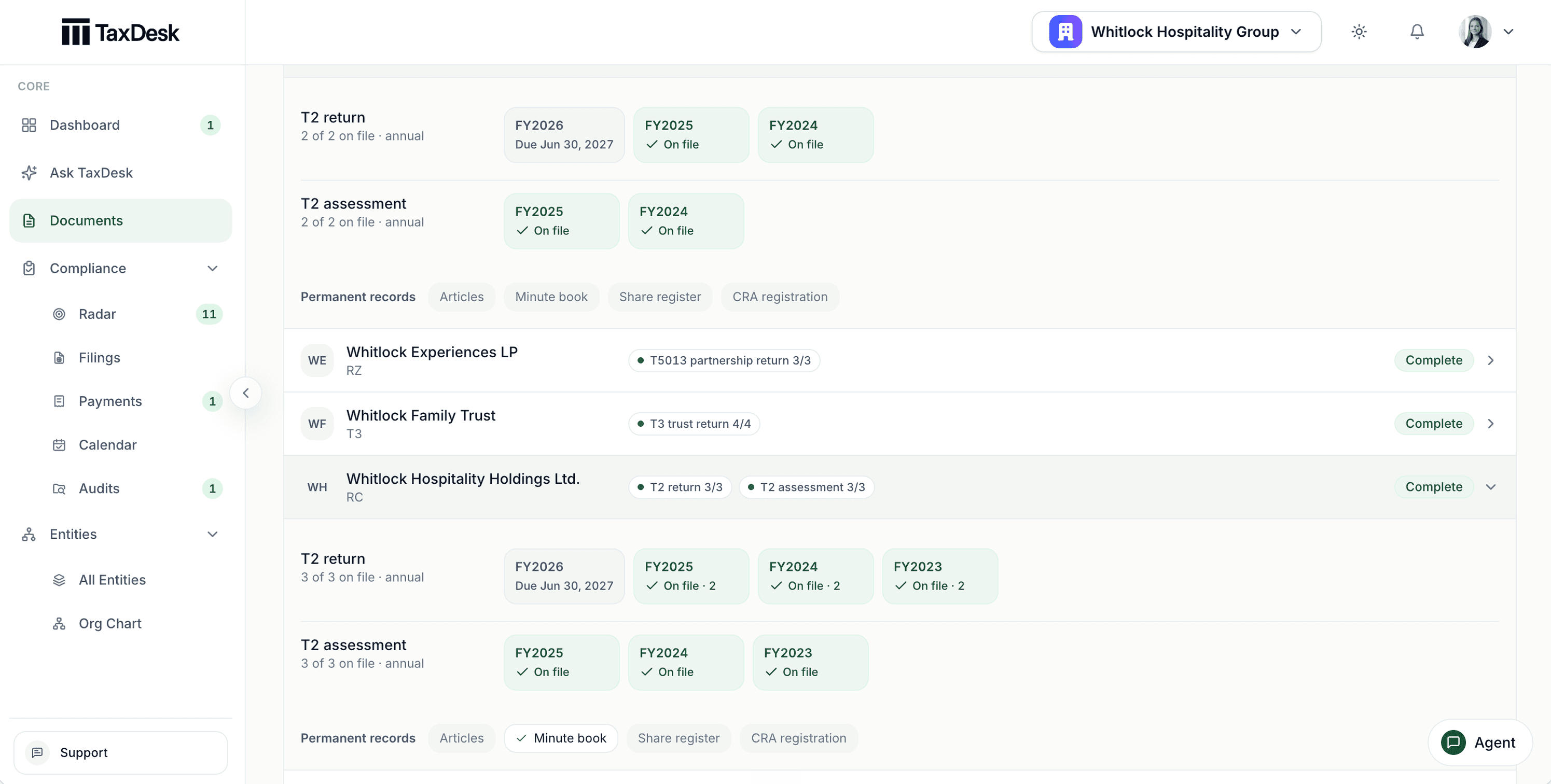
- 1Partnerships and trusts get their own schedule: T5013 and T3
- 2Each period shows what is on file and what is due next
- 3Returns and assessments filed to the right year
- 4Permanent records tracked separately
Facts with their source page beside them.
Each fact TaxDesk reads keeps its page and excerpt. Suggested changes wait for your team, and a fact that disagrees with your record never overwrites it.
- Figures checked against the form’s own arithmetic, with anything that doesn’t reconcile flagged
- Financial statements compared with the T2’s GIFI figures
- Schedule 8 CCA, Schedule 4 losses, and T5013 partner slips brought toward the entity’s balances
- The same fact compared across documents for the same period
See what’s on file, and what isn’t.
The documents register shows each entity’s returns and assessments by year, the next filing due, and permanent records such as articles and the minute book. Filter to the entities with missing documents.
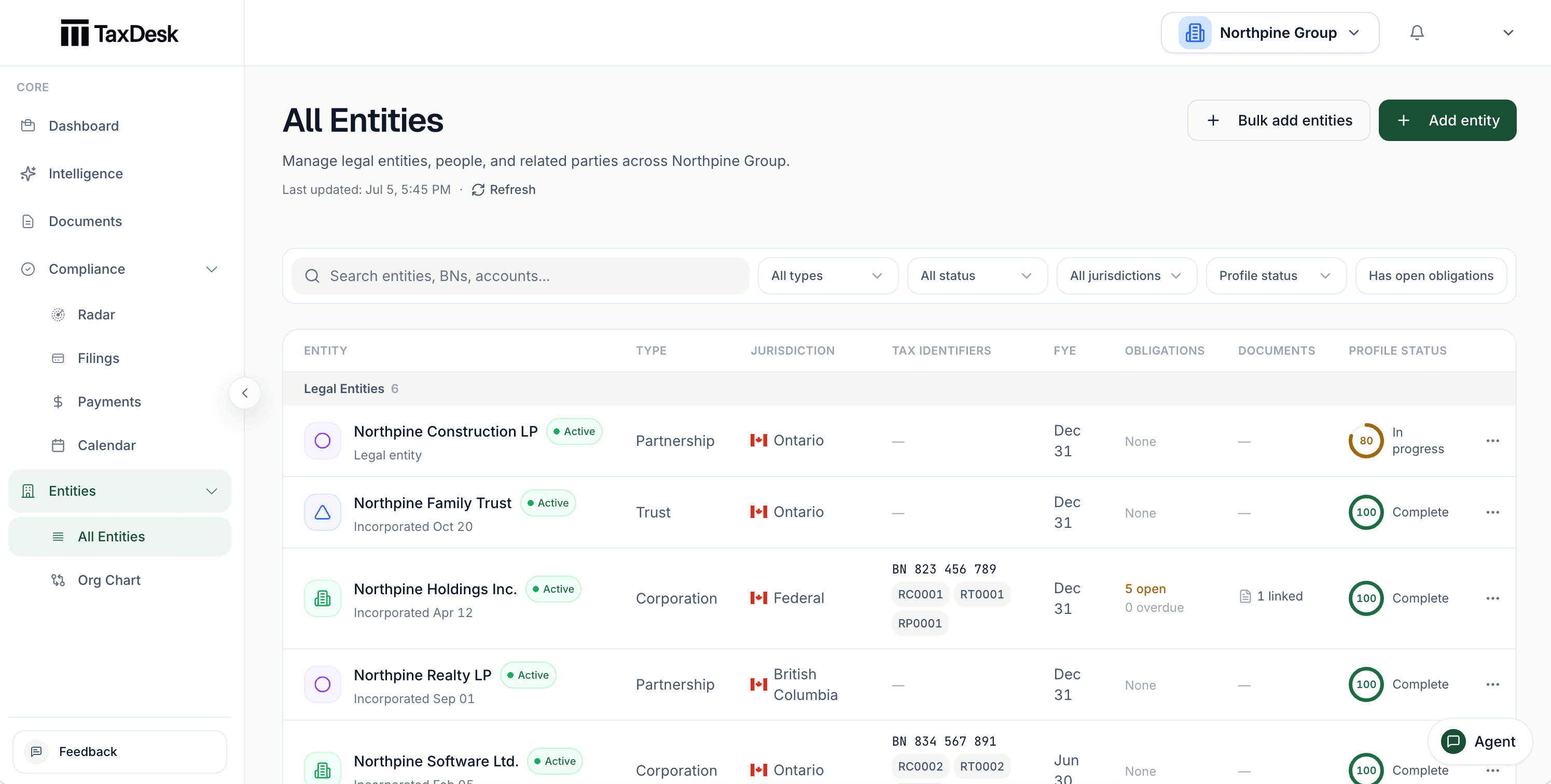
- 1Every entity in one list, with a count
- 2Find an entity by name
- 3Filter to entities with missing documents or items to confirm
- 4Each entity with its CRA program accounts and a status
Seven years at a glance.
Each document stream shows seven years, with earlier years on request.
One document, several entities.
A document can belong to more than one entity, with one primary. Moving it never moves facts that were already applied.
Evidence for each filing.
Link a document to the filing it supports, from the document or from the filing. A filed return with no linked document is counted as unsupported.
Start a workspace from a folder of PDFs.
Upload a group’s returns, notices, and corporate records together. TaxDesk groups what it finds into one proposed setup for each entity, and nothing is created until you confirm it.
A guided review queue.
Work through suggested facts one decision at a time, with the source page beside each one.
Your label stands.
If you choose a document type when you upload, TaxDesk keeps it. When it reads the document differently, it asks instead of overriding you.
Letters become proposed cases.
A CRA audit letter or information request can be proposed as an audit matter, with its requested items. It opens only when you apply it.
A review memo for the file.
Export a PDF summary of a return’s review to keep with your working papers.
Where it stops
TaxDesk reads. Your team decides.
Reading a document is a starting point, not a conclusion. The source stays open beside every suggestion.
- Changes to the recordYour team approves suggested facts and settles conflicts.TaxDesk proposes each fact with its source page, and a conflicting fact waits for approval.
- Tax positionsYour accountant confirms balances and positions.TaxDesk shows what each document says and where it says it.
- The filesYour team decides who is invited to the workspace.Files stay private to the workspace and download only through a signed-in link.
Common questions
Questions about documents.
Which documents can TaxDesk read?
About 50 Canadian business document types: tax returns, information returns and elections, CRA and provincial notices, financial statements and accounting records, corporate records, agreements, and banking records. That includes T2 returns and schedules, notices of assessment, T5013 returns, and section 85 rollover agreements.
Will TaxDesk change our records without asking?
No suggestion that conflicts with your record is applied without approval. Suggested facts wait in a review queue with their source page, and your team decides.
Can we upload a whole folder at once?
Yes. Upload a group’s documents together and TaxDesk proposes one setup per entity it finds, grouped by business number, incorporation number, or name. You confirm it in one step.
What if TaxDesk files a document under the wrong company?
Change the entity. A document can also belong to more than one entity. Facts already applied stay where they are until you move them.
Who can see our documents?
Only people invited to your workspace, within their role. Files are stored privately and download through an authenticated link, never a public one.
Get started
Bring the paper into the record.
Tell us about your entities and the documents you keep today, and we’ll follow up by email.